Every writer knows the feeling: you outline in one app, research in a second, draft in a third, and track characters somewhere else. Scribeist is built to end that juggling act. It is an AI-powered writing platform with three dedicated workspaces, one for novels, one for blogs, and one for general notes, each packed with tools that fit that kind of writing. In this Scribeist review, I break down how it works, the features that actually matter, the current AppSumo lifetime deal, and who should buy it. I also look at honest downsides, because no writing tool is perfect.
Key Takeaways
- Scribeist gives you three purpose-built workspaces (Novel, Blog, General) instead of one generic editor for everything.
- The AI reads your whole project, so it can answer questions about characters, plot holes, and notes with full context, not just the current page.
- Mythos tracking surfaces character profiles, locations, and lore right inside your manuscript, which is rare in writing software.
- Bloggers get live SEO scoring and one-click publishing to WordPress, Ghost, HubSpot, and more, without switching tabs.
- The AppSumo lifetime deal starts at $49 with a 60-day money-back guarantee, but monthly AI credits are limited on the entry tier.
What Is Scribeist?
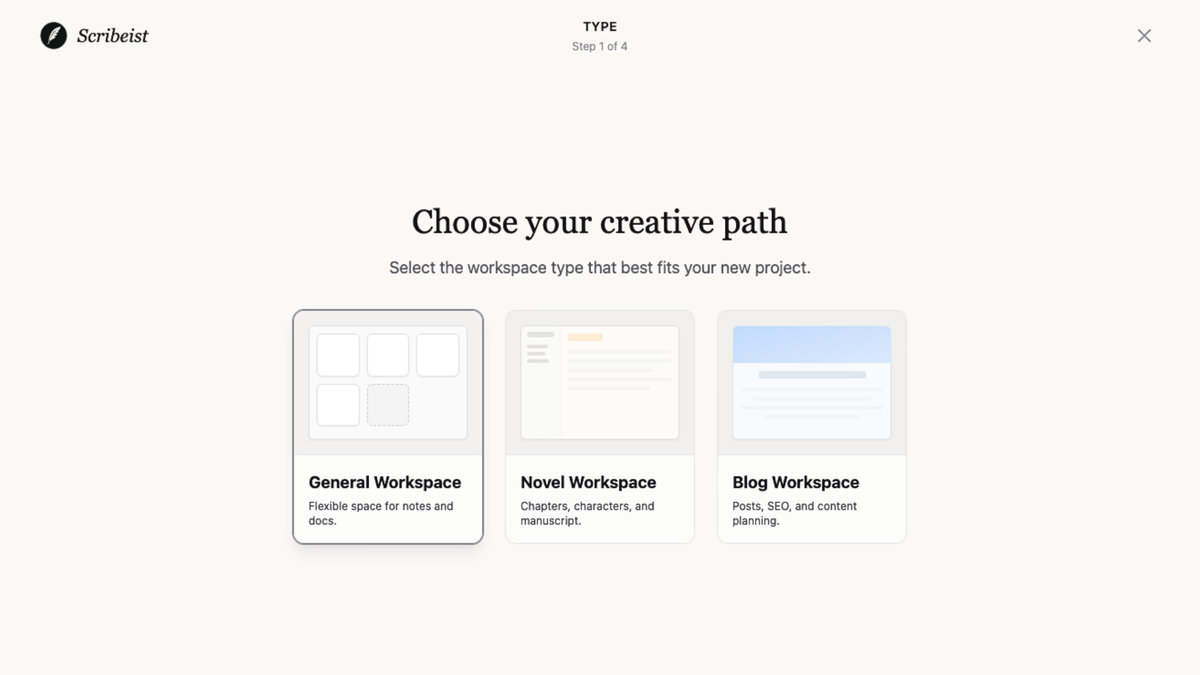
Scribeist is a writing workspace platform built for long-form projects. Instead of handing everyone the same blank editor, it gives you three workspace types, each preloaded with the tools and layout that kind of writing actually needs. The Novel workspace is for fiction, with planning sheets, timelines, and character tracking. The Blog workspace is for articles, with SEO checks and publishing connections. The General workspace is for notes, essays, and freeform writing.
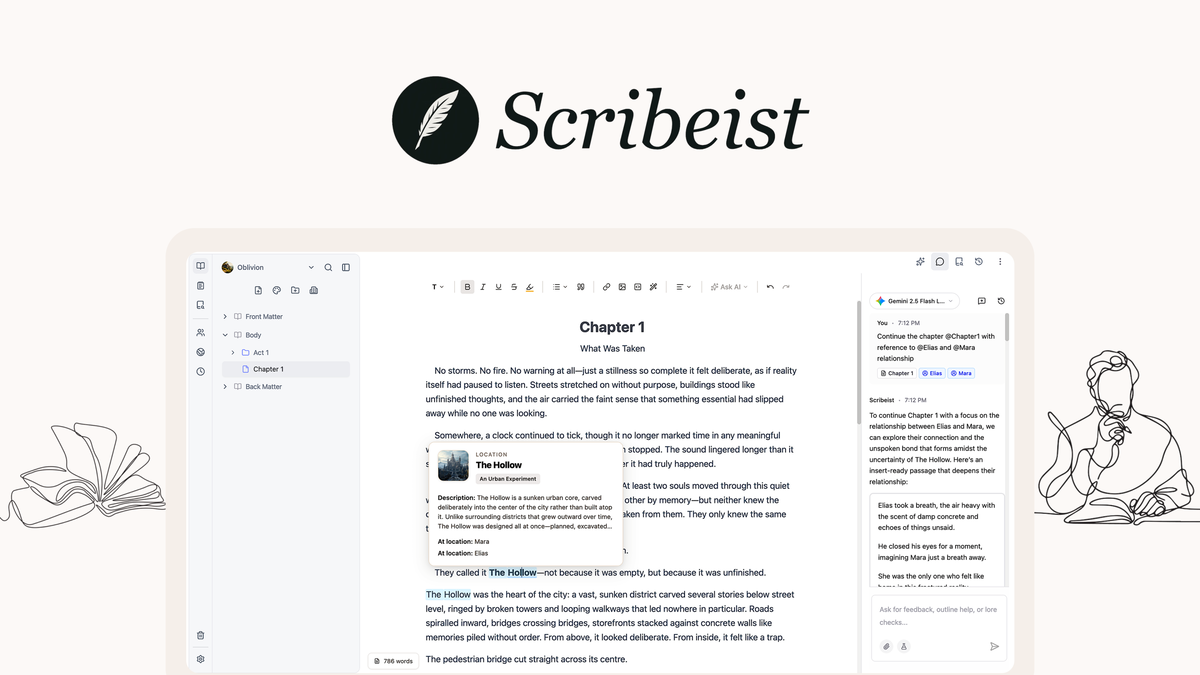
What makes it different from a standard text editor is the AI layer. Scribeist builds a private index of everything in your workspace, so the AI can reference your characters, research notes, and earlier drafts when you ask it something. You can mention any document or character with @ mentions, and the AI answers with context instead of generic advice. The company says your writing is never used to train third-party models, which is a meaningful privacy point for authors.
Scribeist is a young product. It was founded in December 2024 by Tanner Bjorgan in Canada, it is bootstrapped, and it runs with a team of 1 to 10 people. On AppSumo it is positioned as an alternative to Notion and Scrivener. The tool is free to try for seven days with everything unlocked, and the free tier keeps the core editor and export forever.
Key Features
Purpose-Built Writing Workspaces
This is the core idea behind Scribeist. When you start a project, you pick a Novel, Blog, or General workspace, and the app adjusts its tools to match. Novelists get planning sheets, plot boards, chapter cards, and timelines. Bloggers get SEO formatting and publishing options. General users get a clean space for notes and long reads. Workspaces are organized in color-coded folders, so a full library stays manageable. You can also switch between outline, editor, and canvas views without leaving the workspace.
Why it matters: most writing apps treat a blog post and a novel the same way. Scribeist recognizes that different projects need different structures, and it reduces the setup work that usually happens before you write a word.
AI That Knows Your Whole Project
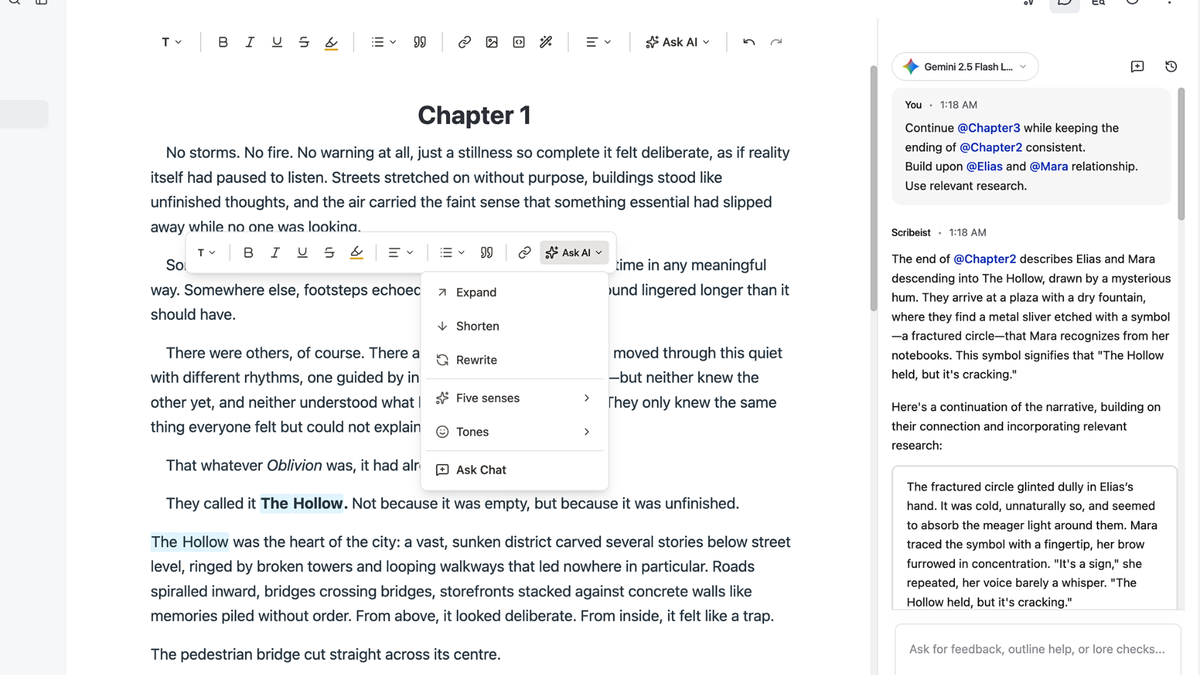
The AI in Scribeist is not a generic chatbot bolted onto a document. It builds a private index of your workspace and uses @ mentions to reference any character, note, or research source directly in chat. You can ask it to continue a chapter based on a character relationship, find where two characters first meet, or check your research against a source document.
You can also teach it your voice. Voice Match lets you give the AI a writing sample, and it builds a reusable style profile that carries across drafts. The AI can generate drafts up to 4,000 words in that tone, and the editor includes AI tools to rewrite, expand, shorten, or change the tone of selected text. The generated output is grounded in your own facts, and the AI cites its sources where relevant.
Where it falls short: output quality still depends on the model you use and how much context you have organized. Like any AI writer, it can produce bland prose if you feed it weak instructions, so it is best treated as an assistant, not a replacement for editing.
Mythos Character and World Tracking
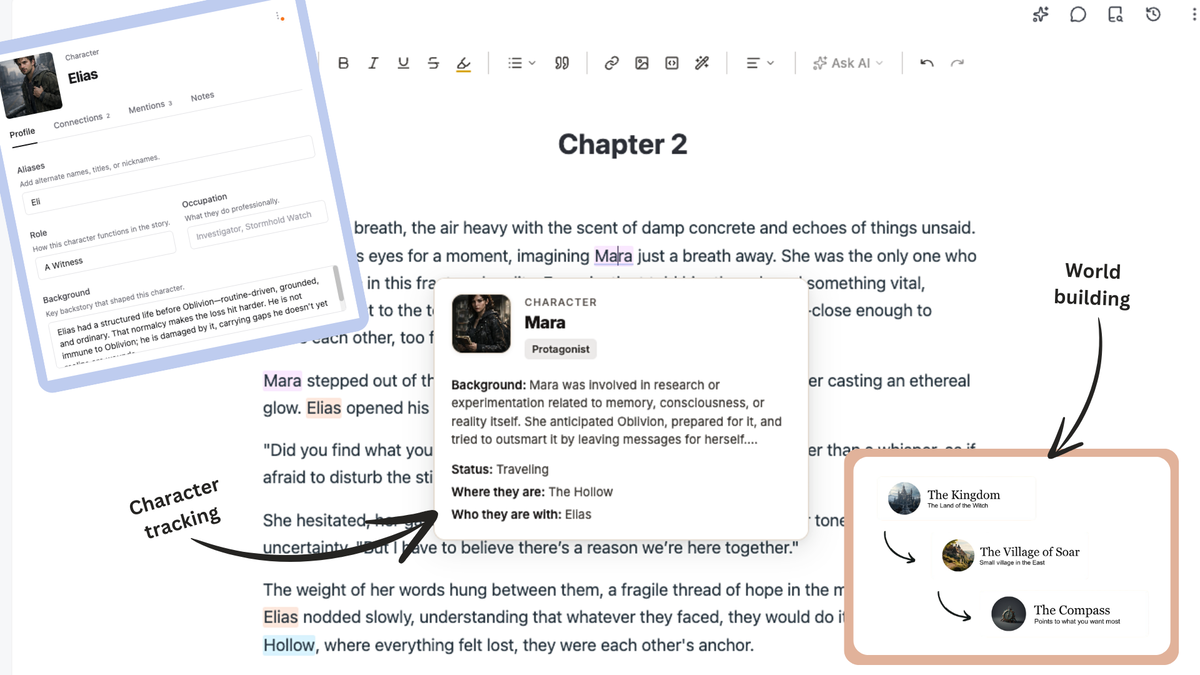
Mythos is Scribeist’s fiction tracking system. Hover over any character name in your manuscript and a profile pops up with their background, current status, location, and who they are with. You can map relationships between characters, locations, and lore, and keep aliases, occupations, and backstory one click away.
Why it matters: continuity errors kill reader trust. If a character’s eye color changes between chapter 3 and chapter 12, readers notice. Mythos makes it easy to keep your world consistent without breaking your writing flow, and it is the kind of feature that is genuinely hard to find in general-purpose writing tools.
Built-In SEO Tools for Bloggers
For blog and article writing, Scribeist tracks keyword density, meta descriptions, and an SEO score while you type. You can optimize slugs, titles, and content length directly in the editor with live scoring feedback. The Blog workspace also includes a site SEO board that can crawl your website, map internal links, find topic clusters, and flag SEO health issues.
This is not a full SEO platform, and it will not replace dedicated tools for deep keyword research. But for a writer who wants publish-ready posts without jumping into a second app, the built-in checks save real time. If you already use a dedicated SEO tool, you may find this feature basic.
One-Click Publishing and Integrations
Scribeist connects to the platforms writers already use. You can publish directly to WordPress, Ghost, Dev.to, Hashnode, Beehiiv, HubSpot, and Micro.blog, and you can export or back up to Google Drive. Notion documents can be imported and exported. The AppSumo listing highlights WordPress and Ghost as the main integrations, and the full list on the official Scribeist website adds several more.
The practical benefit is fewer tabs. You draft, optimize, and publish from one screen, which matters most for bloggers who ship content on a schedule.
Canvas for Visual Planning
Canvas is Scribeist’s visual planning space. You can build mind maps, timelines, and character relationship diagrams using flexible nodes and connections. It is available across all workspaces, which is handy when an idea branches out and a linear document no longer cuts it. For novelists, it pairs well with Mythos for mapping plot threads and character arcs.
Bring Your Own Key (BYOK) and Local Models
Scribeist supports connecting your own AI provider. You can bring API keys for OpenRouter, OpenAI, Google Gemini, Anthropic, and Mistral, or run open-source models locally through LM Studio and Ollama. This is a big deal for privacy-focused writers who do not want their drafts sent to a default cloud model, and it gives power users control over cost and quality.
Pros and Cons
What Scribeist Does Well
- Dedicated workspaces for novels, blogs, and notes, so you are not fighting a one-size-fits-all editor.
- Context-aware AI with @ mentions, a private project index, and source citations.
- Mythos world building is genuinely unique and useful for fiction writers.
- Live SEO scoring plus direct publishing removes steps for bloggers.
- BYOK and local model support give you control over privacy and cost.
- Cheap lifetime deal with a 60-day money-back guarantee reduces risk.
- Your writing is not used to train AI models, per the company’s stated policy.
Where Scribeist Comes Up Short
- Young and small. Founded in late 2024 with a tiny team, so expect rapid change and occasional rough edges.
- Limited social proof. The AppSumo listing shows only 2 reviews at the time of writing, so long-term track record is unproven.
- Monthly credit caps. The $49 tier includes 1,000 AI credits per month, which can run out fast for heavy AI users.
- Future AI models may cost extra. The deal terms note that access to future AI models may be offered at a discount or as an add-on.
- No clear mobile apps. The product appears to be desktop-first, which may disappoint writers who draft on tablets or phones.
- Free plan is limited. No AI tools and no trash recovery on the free tier.
Pricing and AppSumo Deal
Scribeist is running a lifetime deal on AppSumo right now. The entry tier is $49, which AppSumo lists against a $120 regular value, and the deal is covered by AppSumo’s 60-day money-back guarantee. All tiers include the editor, AI writing tools, AI chat, research, planning sheets, Mythos tracking, canvas, exports, WordPress and Ghost integrations, sharing, and writing analytics. The differences are the monthly credit allowance and the SEO site connections.
| Feature | Tier 1 ($49) | Tier 2 ($99) | Tier 3 ($169) |
|---|---|---|---|
| Credits per month | 1,000 | 2,500 | 5,000 |
| SEO site connections | 1 site, 200 index pages | 3 sites, 2,000 index pages | 3 sites, 2,000 index pages |
| Mythos tracking, canvas, BYOK | Included | Included | Included |
| WordPress / Ghost integrations | Included | Included | Included |
| Blog / article generation | Included | Included | Included |
| Plan name | Hobby | Pro | Pro |
AppSumo marks Tier 2 as the recommended pick, and it is easy to see why. The jump from 1,000 to 2,500 credits per month plus 3 SEO site connections covers most bloggers and active novelists, while Tier 3 mainly adds more credits for heavy users. You can activate your license within 60 days of purchase, upgrade while the deal is live, and downgrade within 60 days. One important catch: the deal terms say access to future AI models may be provided at a discounted rate or may require an add-on, so the lifetime price does not guarantee every future model forever.
Who Is It Best For?
Great fit
- Novelists and fiction writers who need character and world consistency and want an AI that understands their story.
- Bloggers and content creators who want SEO checks and direct publishing without leaving the editor.
- Essay writers and note-takers who want one organized home for long-form thinking.
- Privacy-conscious writers who want BYOK and local model options instead of a default cloud AI.
- Anyone tired of switching between a writing app, a research app, and a publishing app.
Look elsewhere
- Writers happy with Scrivener who do not want AI or cloud features.
- Heavy AI users who need unlimited generation and would burn through the monthly credits quickly.
- Teams needing mature real-time collaboration at scale; this is still a young, small product.
- Mobile-first writers who need robust tablet or phone apps.
Is Scribeist Worth It?
Scribeist is worth considering if you write long-form content and the app-switching problem feels real to you. The workspace model is thoughtful, the context-aware AI is genuinely more useful than a generic chatbot, and Mythos fills a gap that most writing tools ignore. The lifetime price of $49 to $169 is low compared to monthly subscriptions for comparable tools, and the 60-day refund window makes the trial risk small.
At the same time, this is an early-stage product from a very small team. Only a handful of AppSumo reviews exist so far, mobile support looks thin, and the credit system means the cheapest tier is not built for heavy AI use. If you need a rock-solid, battle-tested writing platform today, Scribeist may not be there yet. If you like the direction and want to grow with it, the lifetime deal is a low-cost way in.
Scribeist Alternatives
Scrivener
Scrivener is the classic choice for novelists. It offers powerful manuscript organization, corkboards, and compile options, and it is a one-time desktop purchase with no AI dependency. What it lacks is Scribeist’s context-aware AI, Mythos-style hover tracking, and built-in publishing integrations. If you prefer a proven, offline tool and do not care about AI, Scrivener remains a strong pick.
Notion
Notion is a flexible all-in-one workspace for notes, databases, and documents, and it is one of the tools Scribeist positions itself against. It is excellent for organization and collaboration, but it was not designed for long-form creative writing, so fiction features like character tracking and timelines require manual setup. Scribeist offers more structure for writers out of the box, while Notion offers more general-purpose flexibility.
Sudowrite
Sudowrite is an AI writing tool aimed at fiction authors, with features for brainstorming, rewriting, and describing scenes. It excels at generating creative text, but it is less of a full writing workspace and more of an AI sidekick for an existing manuscript. Scribeist bundles organization, tracking, and publishing into one platform, whereas Sudowrite focuses on the AI generation layer.
Frase
Frase is a dedicated SEO content optimization platform for bloggers and marketers. If your main goal is ranking content, it offers deeper keyword research and content briefs than Scribeist’s built-in SEO scoring. We covered this in more depth in our Frase review and in our Scalenut vs Frase comparison. For a pure SEO workflow, Frase is the specialist; for a writing-first workflow with SEO checks included, Scribeist is the all-rounder.
Final Verdict
Main reason to buy: you write long-form content, want a context-aware AI that understands your characters and research, and want novel, blog, and note tools in one place at a low lifetime price.
Main reason to skip: you need a mature, proven platform with strong mobile apps and unlimited AI usage, or you simply do not want AI in your writing workflow.
For everyone in between, Scribeist is one of the more interesting writing tool deals on AppSumo right now. The 60-day refund window means you can test it on a real project before committing.
Frequently Asked Questions
Is Scribeist free?
Scribeist offers a 7-day free trial with all Pro features unlocked. After the trial, the free plan keeps the core editor and basic export options forever, but AI tools, canvas, version history, and tracking features are reserved for paid plans.
How do Scribeist credits work?
Credits are tied to your active subscription. Paid plans include monthly credits, and you can buy additional credit bundles. If you cancel, monthly credits expire but purchased credits are preserved and return when you reactivate a paid plan. The system uses monthly credits first.
Can I export my writing from Scribeist?
Yes. Scribeist supports export to PDF, DOCX, Markdown, and EPUB, and it can publish directly to Ghost, WordPress, Substack, and Medium. You can also back up to Google Drive or sync with Notion.
Which AI models does Scribeist support?
With a BYOK plan you can connect OpenRouter, OpenAI, Google Gemini, Anthropic, and Mistral, and you can run open-source models locally through LM Studio or Ollama. The deal terms note that access to future AI models may be offered at a discounted rate or as an add-on.
Is the Scribeist AppSumo deal worth it?
At $49 for lifetime access with a 60-day money-back guarantee, it is a low-risk entry if you write long-form content. Heavy AI users should consider Tier 2 for more monthly credits, and everyone should remember that future AI models may require an add-on.
Is Scribeist good for novels or blogs?
Both, but for different reasons. Novelists get Mythos character and world tracking, planning sheets, and timelines. Bloggers get live SEO scoring, readability feedback, and one-click publishing to major platforms. The General workspace covers essays, notes, and everything in between.