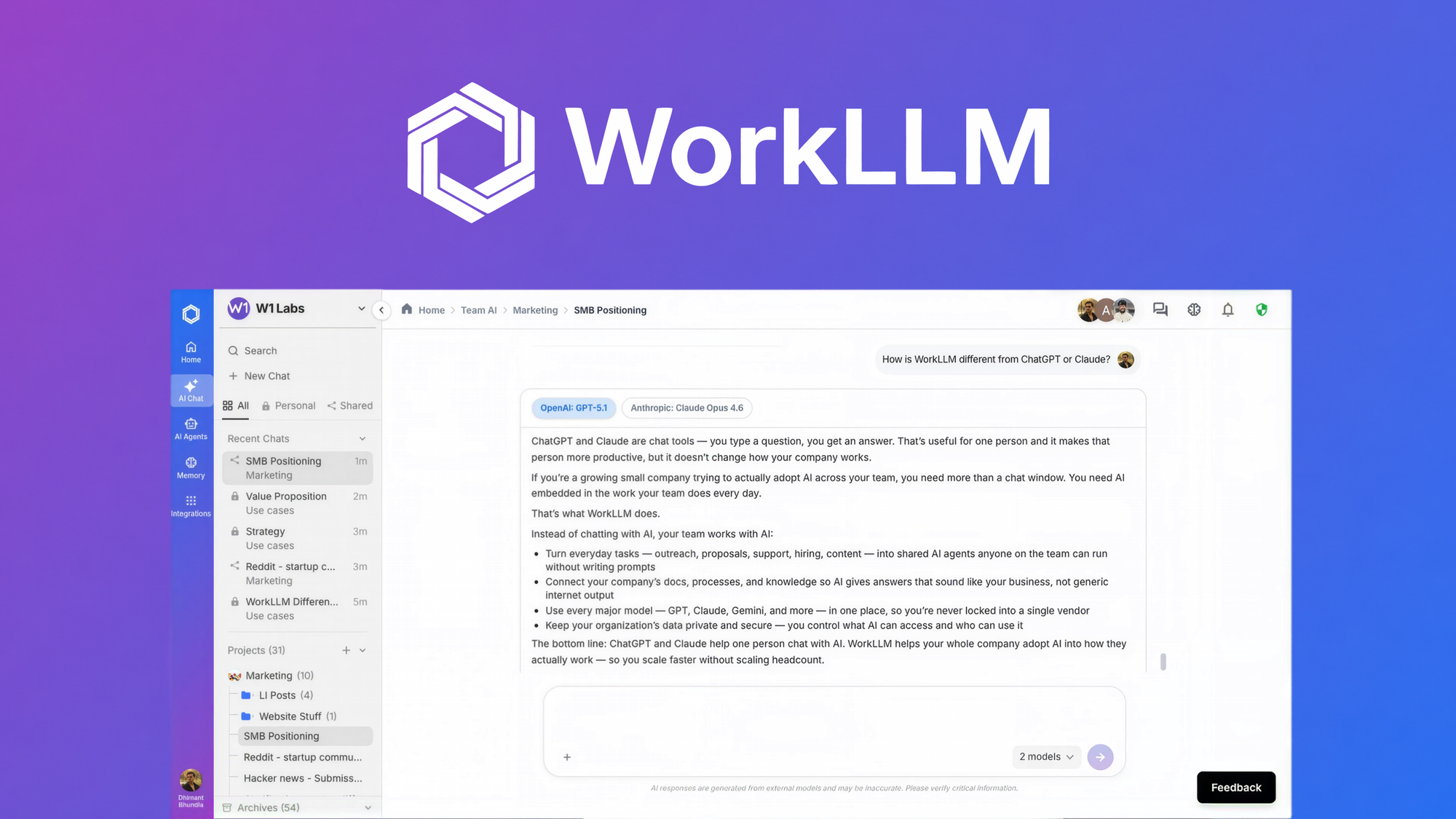
WorkLLM is a team AI workspace that puts 200+ AI models, shared organization memory, and ready-made agents into one place, so small teams can use AI for daily work without technical skills. If you have watched a team start using ChatGPT in separate tabs and then lose every conversation, you already know the problem this tool tries to solve.
In this WorkLLM review, I dig into the features, the pricing tiers, and the credit system, and I keep it honest about the limitations. You will learn what the tool actually does, who it helps most, and whether the AppSumo deal makes sense in 2026.
WorkLLM Review: Key Takeaways
- WorkLLM gives your whole team one workspace with 200+ AI models, including GPT, Claude, and Gemini.
- Organization memory stores company context in five layers, so the AI already knows your products and past work.
- Ready-made AI agents handle research, drafting, and summaries without prompting skills.
- The AppSumo deal starts at $79, but real team use needs Tier 2 at $179.
- The product is young and pre-seed, so weigh the low price against long-term risk.
What Is WorkLLM?
WorkLLM is an AI workspace built for small and mid-sized businesses that want to bring AI into everyday work without hiring an AI expert. Instead of everyone using a separate ChatGPT tab, the team works in one shared space where chats, documents, and saved answers live together. The company behind it is based in Toronto, was founded in February 2026, and is still at pre-seed stage.
The idea is simple: if you can type a message or fill in a form, you can use AI. You pick a model or let WorkLLM choose one for you, run ready-made agents for common jobs, and build a company memory so nobody has to re-explain the business in every prompt.
What makes it different from a plain chatbot is the team layer. Threads are shared, teammates comment and tag each other on AI answers, and good outputs can be saved to memory so the next person builds on them instead of starting over. AppSumo positions it as an alternative to scattered tools like Slack, Teams, and Notion. If you are also weighing all-in-one business software, our SuiteDash review covers another popular option for small teams.
WorkLLM Key Features
Multi-model chat with 200+ LLMs
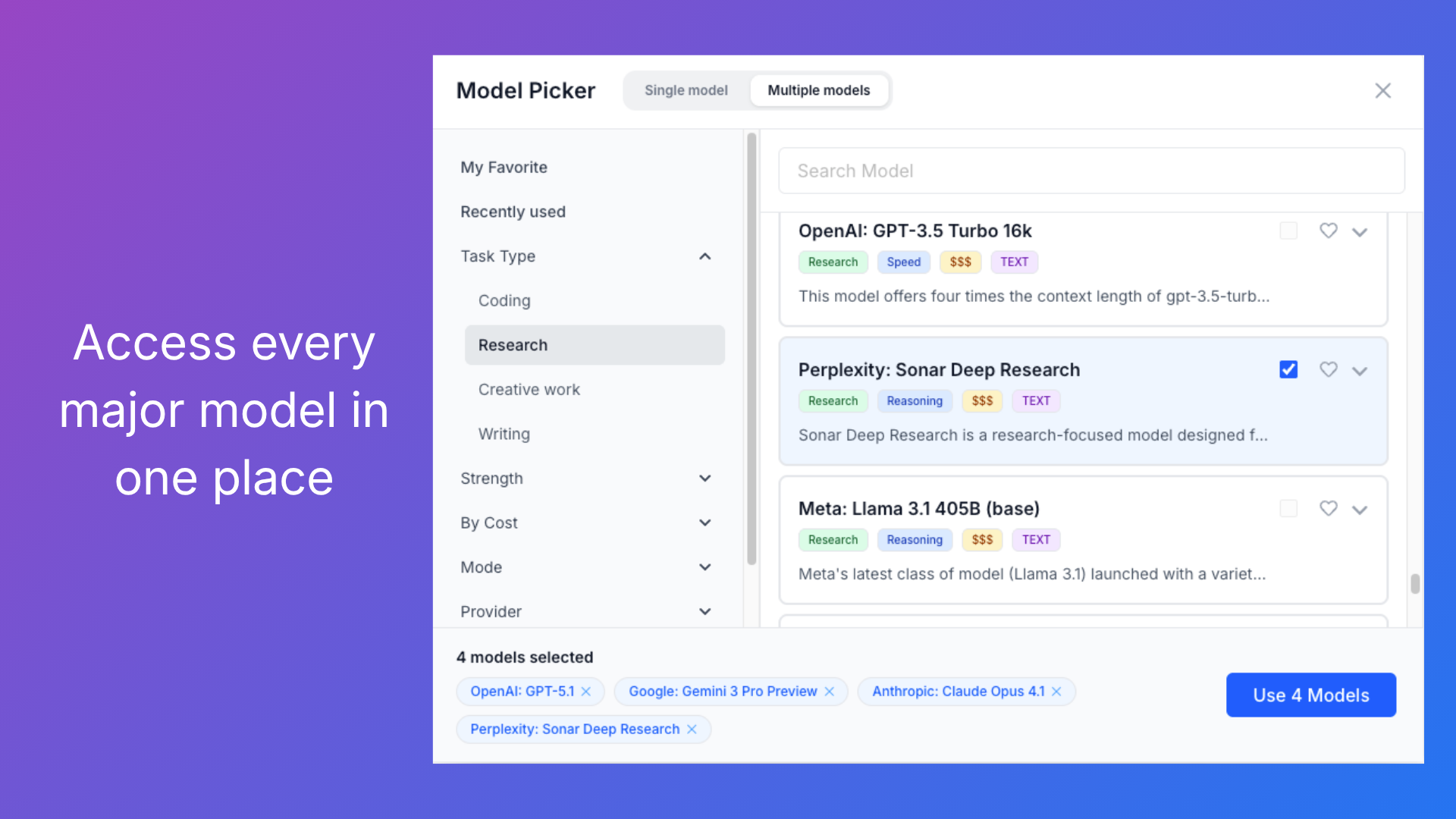
You get GPT, Claude, Gemini, Llama, Mistral, and 200+ others from one interface, with no separate subscriptions. You can select up to four models and send the same prompt to all of them, then compare answers side by side and pick the best one before acting. Filters for task type, cost, and strength help you match the model to the job.
Why it matters: teams avoid vendor lock-in and always have a model suited to the task. Who benefits: marketers, researchers, and anyone who wants the best answer, not just the first one. Where it falls short: the deal terms say future models may be offered at a discounted rate or require an add-on, so the full model catalog is not guaranteed forever.
Shared threads and team collaboration
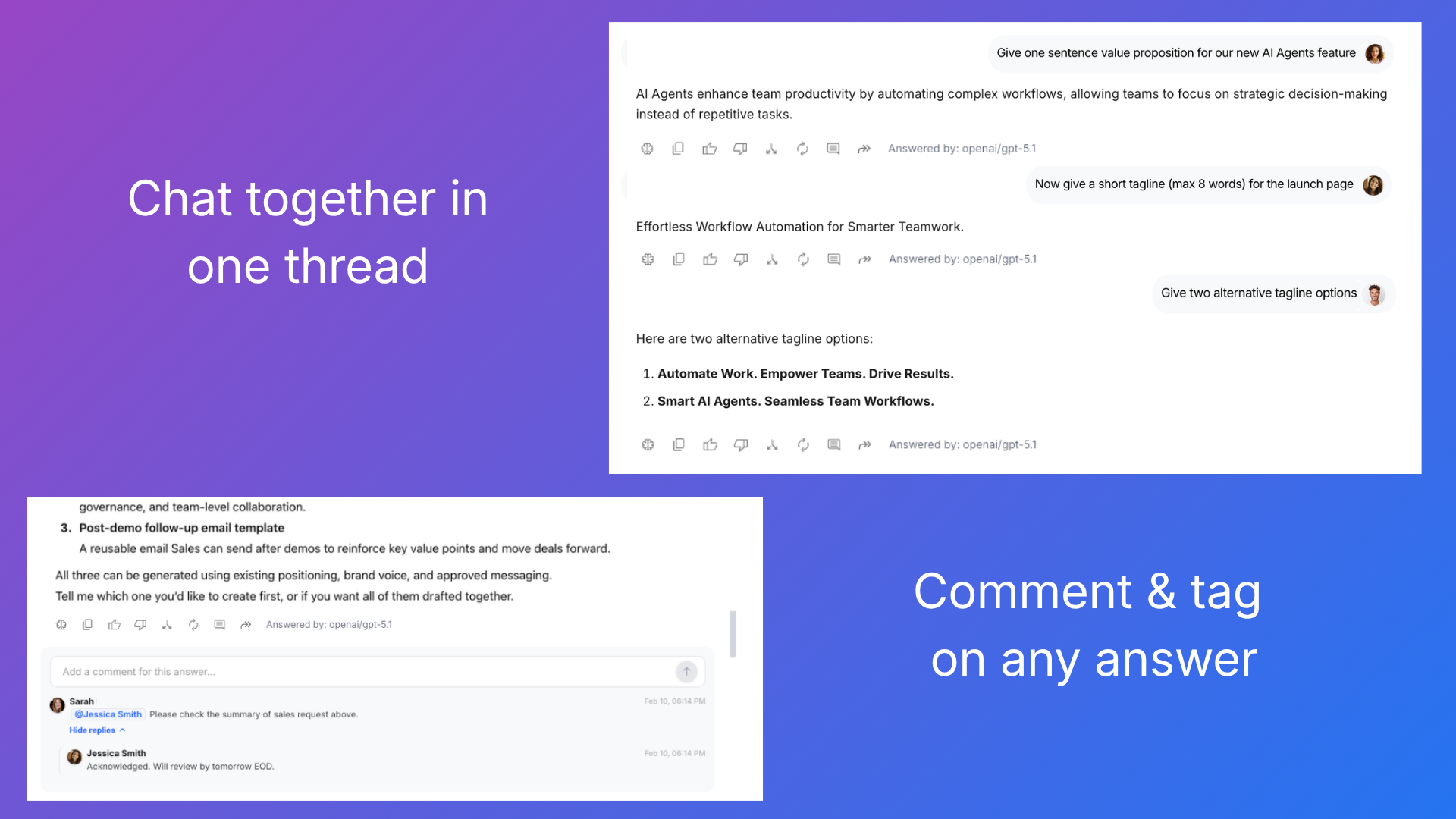
Co-prompt with teammates in shared AI threads, comment and tag people on any response, and share outputs directly in the thread instead of copying them elsewhere. You can even fork a conversation to explore an option without losing the original.
Why it matters: AI work becomes visible and reviewable, not a private black box. Who benefits: remote teams that live in chat and want everyone on the same context. Where it falls short: collaboration only becomes useful from Tier 2 up, because Tier 1 is limited to one user.
Organization memory in five layers
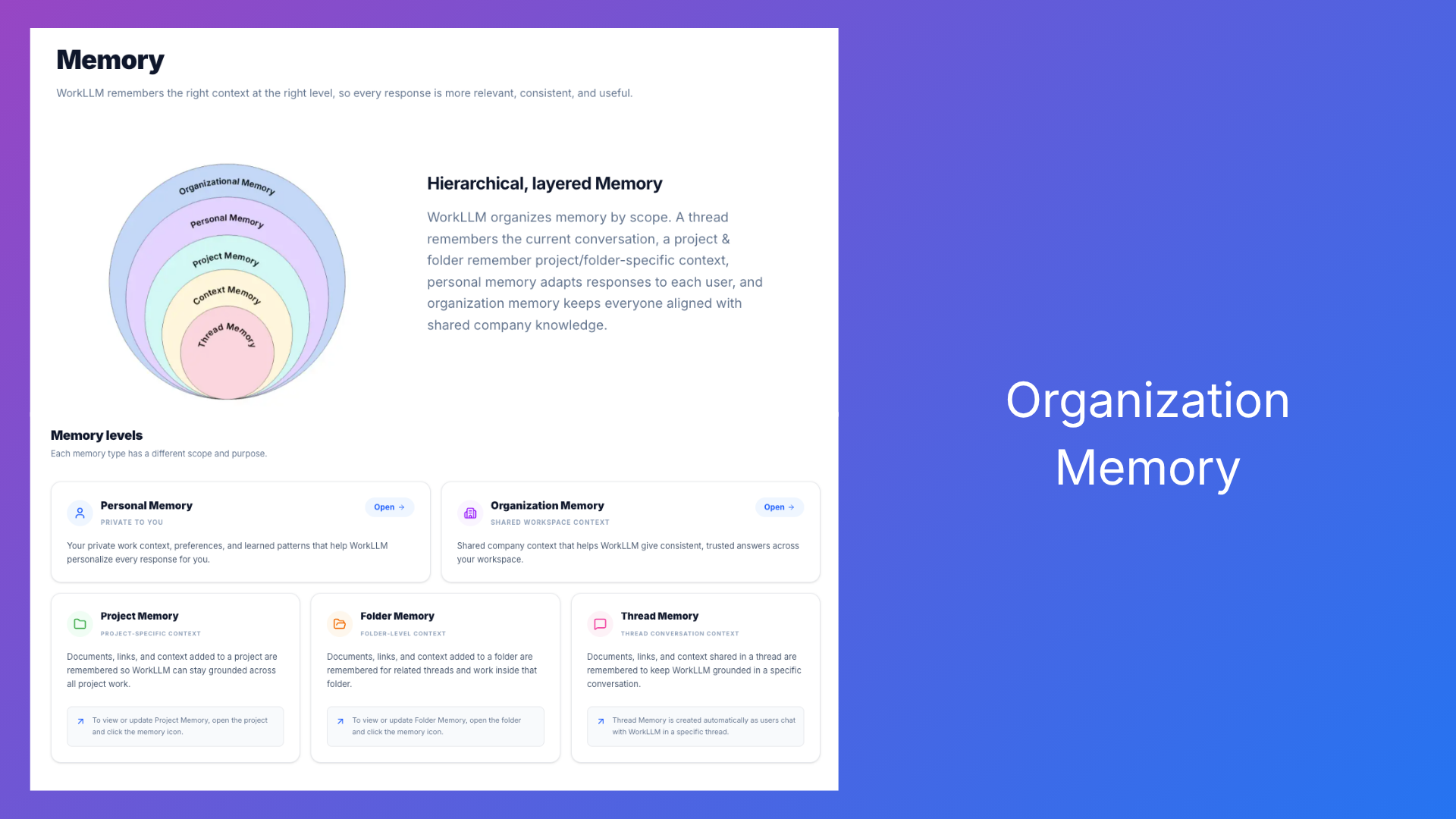
WorkLLM remembers your company through thread, personal, project, team, and org-wide memory. The AI pulls context from stored documents, past work, and saved answers, so responses are grounded in your actual products and processes. A one-click save turns any good answer into reusable knowledge for the whole team.
Why it matters: teams stop re-explaining context and stop losing knowledge when someone leaves. Who benefits: agencies, ops leads, and any team with shared processes. Where it falls short: uploading documents to memory consumes credits once, and early users note that document access control is organized through projects and folders rather than simple org-level permissions.
Ready-made AI agents (Tier 2 and above)
Knowledge agents answer questions from your org memory with sources. Task agents draft, summarize, and research in one click. Workflow agents run automatically on a schedule or when something happens. Prebuilt agents cover sales, marketing, HR, and more.
Why it matters: it removes the skill barrier, so non-technical staff can get useful output without writing prompts. Who benefits: small teams that need to scale output without adding headcount. Where it falls short: agents are not included in Tier 1, so the cheapest plan misses the biggest time-saver.
Web search and deep research
Run web searches and multi-step research inside the chat thread without leaving the workspace.
Why it matters: research stays attached to the conversation and the memory layer. Who benefits: marketers and analysts who gather sources daily. Where it falls short: heavy research consumes credits faster than normal chat, so you need to budget.
Chat with documents, images, audio, and video
Upload files and ask questions about them, so reports, calls, and media become part of the conversation.
Why it matters: it turns passive files into working knowledge. Who benefits: teams that handle lots of documents, contracts, and recorded meetings. Where it falls short: indexing files uses credits once, and document-heavy workflows can drain a small monthly pool.
Integrations and governance
Connect Gmail, Google Calendar, Google Drive, Jira, Notion, Slack, CRM tools, and marketing platforms. Admin controls cover roles, access, audit logs, encryption, and usage reports.
Why it matters: owners keep control over what AI can see and who can run it. Who benefits: small businesses that still need basic oversight. Where it falls short: the integration list is solid but younger than mature ecosystems like Microsoft 365 Copilot.
WorkLLM Pros and Cons
Pros:
- 200+ models in one workspace with side-by-side comparison.
- Organization memory saves context and reduces repeated prompting.
- Ready-made agents lower the skill barrier for non-technical teams.
- Shared threads make AI work visible and collaborative.
- Lifetime access with a 60-day money-back guarantee.
Cons:
- Very young product from a pre-seed team founded in February 2026.
- Tier 1 is one user, so team features need the pricier tiers.
- Credits are usage-based and can be hard to estimate.
- Future model access may need add-ons.
- Small review base, with early feedback calling it promising but not there yet.
WorkLLM Pricing and AppSumo Deal
AppSumo sells lifetime access in four tiers. All of them include AI chat, multi-LLM access, web search and deep research, chat with documents and media, organization memory, and email support. The table shows how the tiers scale.
| License Tier 1 | License Tier 2 | License Tier 3 | License Tier 4 | |
|---|---|---|---|---|
| Price | $79 | $179 | $299 | $589 |
| List value | $240 | $1,800 | $5,400 | $10,000 |
| AI credits per month | 800 | 2,000 | 4,000 | 8,000 |
| Users | 1 | 5 | 15 | Unlimited |
| AI agents | No | Yes | Yes | Yes |
| Best for | Solo users | Small teams | Growing teams | Whole company |
AppSumo marks Tier 3 as Recommended, and it is the sweet spot for most growing teams because it adds 4,000 credits and 15 users.
A credit is WorkLLM’s internal unit for model usage. A roughly 500-word answer costs about 2 credits on a lighter model and around 3 credits on a top-tier model. For everyday mixed use, 800 credits typically cover 200 to 300 interactions. You do not have to pick a model manually; WorkLLM chooses a recommended one that balances quality and cost. The official WorkLLM documentation explains the credit system in more detail.
Deal terms worth knowing: you must activate the license within 60 days, you can upgrade while the deal is live but can only downgrade within 60 days of purchase, and access to future AI models may be offered at a discounted rate or require an add-on. You are covered by AppSumo’s 60-day money-back guarantee. If you want the full picture before buying, check the current WorkLLM AppSumo deal.
Who Is WorkLLM Best For?
Good fit:
- Small businesses and remote teams that want one shared place for AI.
- Marketers and content teams doing research, drafting, and reporting.
- Ops leads who want ready-made agents instead of prompt training.
- Teams already using ChatGPT separately that need shared context.
- Agencies that need consistent brand voice across client work.
Look elsewhere:
- Solo users who just need a free chatbot.
- Large enterprises with strict compliance and mature AI governance needs.
- Teams that need deep, proven integrations with every tool in the stack.
- Buyers who are not comfortable with a very young, pre-seed company.
Is WorkLLM Worth It?
For a small team that wants to move AI from personal tabs into daily work, WorkLLM delivers real value at a fair price, especially at Tier 2 or Tier 3 where agents and collaboration unlock. The credit system is transparent about costs, and the 60-day guarantee lowers the risk of trying it.
The main question is timing. The product is very young, the review base is thin, and some limits, like future model access and document-level permissions, are still evolving. If you need a stable, long-term platform today, wait and watch. If you want a low-cost way to get a small team using AI together, and you accept early-stage risk, the AppSumo deal is a reasonable bet.
WorkLLM Alternatives
ChatGPT Team
ChatGPT Team is the obvious comparison. It gives your team the same models with a mature, proven product and simple per-seat monthly pricing. It does not include organization memory or ready-made agents in the same way, and the subscription adds up over time. WorkLLM’s own ChatGPT comparison page walks through the differences in detail.
Notion AI
If your team already lives in Notion, the built-in AI adds drafting, summarizing, and Q&A on your docs without a new tool. You get far less model choice, no multi-model comparison, and no dedicated agent library, but the learning curve is close to zero for existing users.
Poe
Poe is a multi-model chat platform that gives individuals access to many LLMs in one place. It is excellent for personal experimentation and quick answers, but it lacks team threads, organization memory, and ready-made agents, so it does not replace WorkLLM for team workflows. For automation-heavy tasks, our TaskMagic review covers an AI tool built for agentic work.
Final Verdict
Main reason to buy: your small team gets 200+ models, shared memory, and ready-made agents in one workspace for a one-time price, with a 60-day guarantee.
Main reason to skip: you want a mature, well-reviewed platform with guaranteed access to every future model, or you are a solo user who only needs basic chat.
WorkLLM FAQ
What is WorkLLM?
WorkLLM is a team AI workspace for small and mid-sized businesses. It combines multi-model chat, organization memory, and ready-made AI agents so teams can use AI for daily work without technical skills.
How do WorkLLM credits work?
Credits are WorkLLM’s internal unit for actual model usage, based on the provider’s token cost plus platform costs. A roughly 500-word answer costs about 2 credits on a lighter model and around 3 credits on a top-tier model. 800 credits typically cover 200 to 300 everyday interactions.
Is WorkLLM better than ChatGPT?
It depends on your setup. For an individual, ChatGPT is simpler and free to start. For a team, WorkLLM adds shared threads, organization memory, and ready-made agents that ChatGPT does not offer in the same way.
Which WorkLLM AppSumo tier should I choose?
Tier 1 at $79 is for solo users with 800 monthly credits. Teams should start at Tier 2 at $179 for 5 users and agents. Tier 3 at $299, marked Recommended, fits most growing teams with 15 users and 4,000 credits.
Is WorkLLM a lifetime deal?
Yes. You pay once and get lifetime access with all future Basic (Tier 1) or Pro (Tier 2 to 4) plan updates. You must activate the license within 60 days, and AppSumo’s 60-day money-back guarantee applies.
Can my whole team use WorkLLM together?
Yes, on Tier 2 and above. Teams share threads, comment and tag each other on AI answers, and build on saved outputs. Tier 1 is limited to one user.