If you have ever tried to automate a repetitive task, you already know the frustration. Traditional automation tools like Zapier and Make are powerful, but they only work with apps that have APIs. And when you need something done inside a website that has no API, you are stuck doing it manually or paying for expensive RPA software.
TaskMagic solves this problem in a way that feels almost too simple. Instead of building complex node diagrams or configuring webhooks, you describe what you want in plain English, and TaskMagic builds the automation for you. It connects to thousands of apps like Zapier does, but it also automates anything you do in a browser. That includes websites with no API.
I spent time testing TaskMagic thoroughly to understand what it can and cannot do. This TaskMagic review covers everything you need to know before deciding whether to buy the AppSumo lifetime deal.

What Is TaskMagic?
TaskMagic is an AI-powered automation platform that combines two capabilities in one tool. First, it connects to thousands of apps through API integrations, just like Zapier or Make. Second, it automates anything you do inside a browser, which means it works on websites that have no API at all.
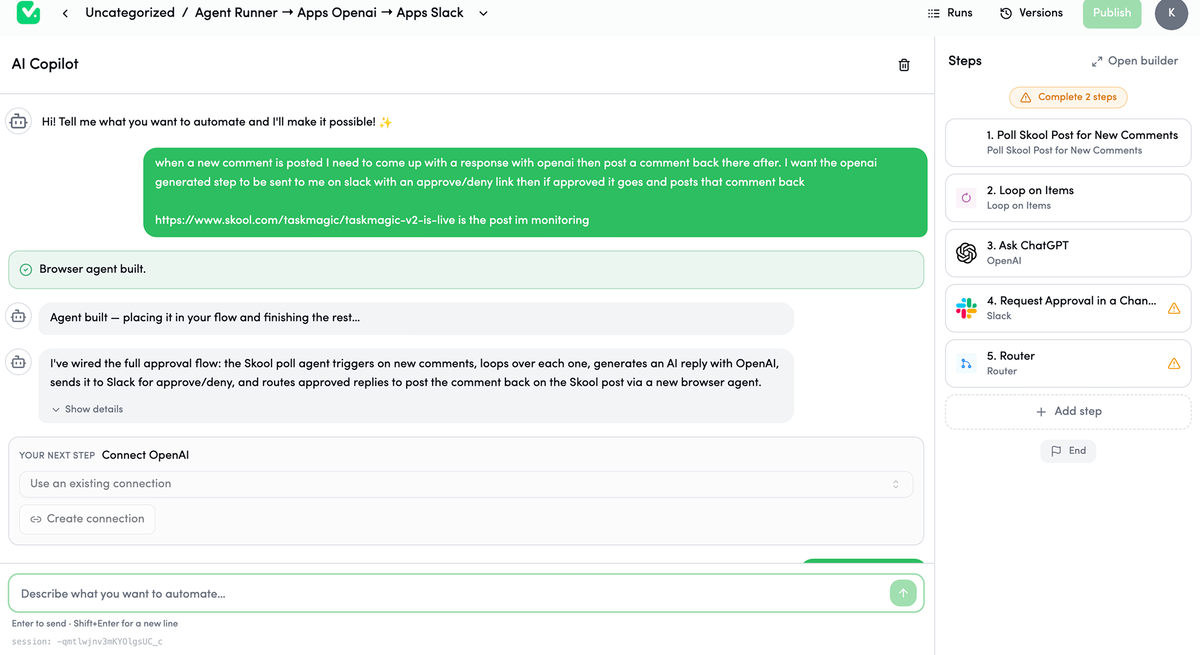
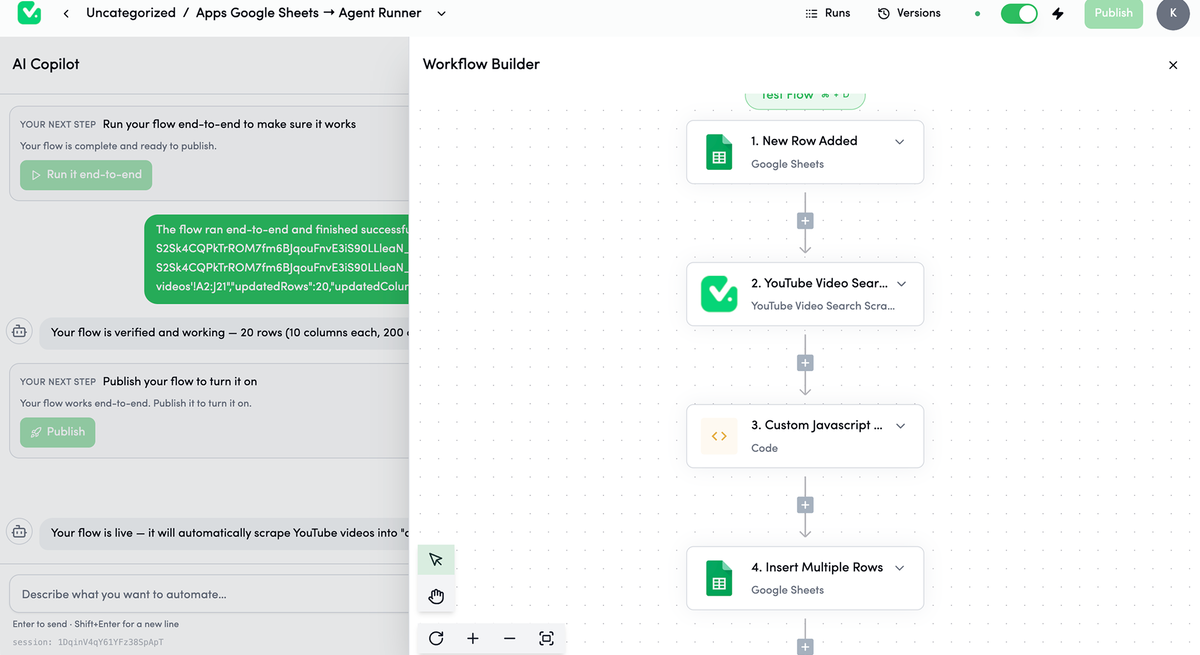
The core idea is straightforward. You describe your automation goal in everyday language. TaskMagic’s AI Copilot turns that description into a step by step workflow. You review the plan, make adjustments if needed, and then the automation runs on a schedule or trigger without using AI credits on every execution.
This approach matters because most AI automation tools charge you every time the AI thinks. TaskMagic uses AI only during the build phase. Once built, the workflow runs deterministically, which keeps costs predictable and low.
Founded in 2019 and based in West Hollywood, TaskMagic is backed by a team that has been featured in the Inc. 5000 list. Companies like Microsoft, Amazon, Salesforce, Cisco, and Deloitte trust the platform, which is a strong signal of its reliability.
Main Features of TaskMagic
AI Copilot: Build Automations in Plain English
The standout feature of TaskMagic is its AI Copilot. Instead of dragging nodes or configuring triggers and actions manually, you type a sentence describing what you want. For example: “Every morning, check my competitors’ pricing and update my Google Sheet.” TaskMagic analyzes your request, proposes a workflow, and builds it.
This matters because the hardest part of automation is the setup. Most people know what they want to automate but struggle with the technical implementation. The AI Copilot removes that barrier completely. You do not need to know anything about APIs, webhooks, or JSON parsing.
The AI is not guessing either. It shows you every step before executing anything, so you can review, approve, or request changes. You remain in control throughout the process.
Browser Automation: Automate Websites Without APIs
This is where TaskMagic separates itself from Zapier and Make. Many useful websites do not offer APIs. Think of competitor pricing pages, job boards, real estate listings, or internal dashboards. Traditional automation tools cannot touch these.
TaskMagic automates the browser directly. It can click buttons, fill forms, scrape data, and navigate pages just like a human would. If you can see it in your browser, TaskMagic can automate it. This makes it useful for web scraping, data entry, competitor monitoring, and any task that involves interacting with websites that have no integrations.
Pre Built Templates
TaskMagic includes a library of pre built workflow templates covering common use cases. These include lead enrichment, competitor monitoring, abandoned cart recovery, and more. You can copy any template into a new workflow and customize the steps to match your exact process.
Templates save time because you do not start from a blank canvas. Even if a template is not a perfect match, it gives you a structure to build on, which is faster than building everything from scratch.
Visual Workflow Builder
For users who prefer more control, TaskMagic includes a visual workflow builder. You can configure browser steps like clicks, typing, and scraping using the browser block. You can add filters, delays, loops, and even custom JavaScript for edge cases.
The builder lets you test and debug each step before publishing. This ensures your automation runs cleanly the first time instead of failing silently in production.
Workspaces and Organization
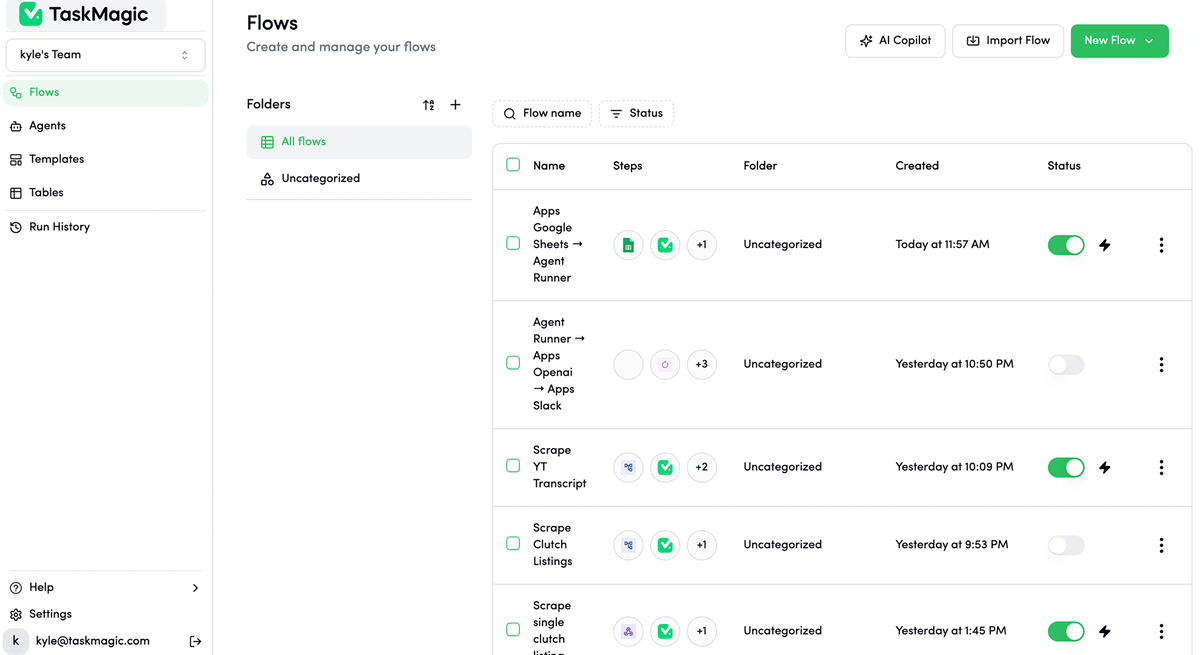
As your automation library grows, TaskMagic helps you stay organized with workspaces and folders. You can create separate workspaces for different clients, projects, or departments. The dashboard shows run history and status for every workflow, so you always know what ran, when, and whether it succeeded.
App Integrations
TaskMagic connects with thousands of apps through its integration library. Google Sheets, Gmail, Slack, Stripe, HubSpot, Salesforce, Mailchimp, Airtable, and many more are supported. If an app has an API, TaskMagic can likely connect to it.
The combination of app integrations plus browser automation means TaskMagic covers the full range of automation needs in one platform.
Pros of TaskMagic
- Plain English automation: You describe what you want and the AI builds it. No learning curve for the setup phase.
- Browser automation included: TaskMagic works on any website, including those without APIs. This is something Zapier and Make cannot do.
- Deterministic execution: Once built, automations run without AI charges. This keeps ongoing costs low and predictable.
- Pre built templates: A library of ready made workflows helps you get started quickly.
- Desktop app available: TaskMagic runs locally on your machine via the desktop app and Chrome extension. Your data stays on your computer.
- Generous AppSumo deal: The lifetime deal offers significant savings compared to the monthly subscription.
- Active development: The team is responsive to feedback and regularly ships updates. V2 is already in development with significant improvements.
Cons of TaskMagic
- Learning curve for advanced workflows: While basic automations are easy, complex workflows with multiple conditions and custom logic require more effort to set up.
- System resource usage: Browser automations run locally on your machine, which means they consume CPU and memory while running. This is not a cloud based RPA solution.
- Credit system can be confusing: The AI build uses credits (150-250 per build), and app runs use a few credits each. Understanding the credit consumption takes some getting used to.
- Not fully plug and play for every scenario: Some websites with complex JavaScript or anti bot measures may require additional configuration.
- Limited table storage: Even the higher tiers cap tables at 25, which may not be enough for data heavy workflows.
Who Is TaskMagic Best For?
TaskMagic is best suited for:
- Solopreneurs and freelancers who need to automate repetitive web tasks but do not have the budget for expensive enterprise RPA tools or the technical skills for complex workflow builders.
- Small business owners who want to connect their apps and automate browser tasks without hiring a developer or paying for multiple tools.
- Sales and marketing teams that need to monitor competitors, scrape leads from directories, or automate outreach across platforms.
- Operations managers who handle data entry, report generation, and cross platform data syncing that involves websites without APIs.
- Agencies that manage automations for multiple clients and need workspace separation and team collaboration features.
- Solo ($29/month): 5,000 credits, full builder access, unlimited connections and active flows, 3 tables, single seat.
- Pro ($79/month): 15,000 credits, everything in Solo plus MCP access, more tables.
- Business ($119/month): 25,000 credits, everything in Pro plus team seats and BYOK.
- Scale ($199/month): 50,000 credits, unlimited everything.
- Tier 1 ($89): 0 team members, 1 team, 3,000 monthly credits, 2,000 AI credits, 10 active flows, 5 connections, 1 table.
- Tier 2 ($169): 2 team members, 1 team, 6,000 credits, 2,000 AI credits, 25 active flows, 10 connections, 3 tables.
- Tier 3 ($369): 20 team members, unlimited teams, 15,000 credits, 2,000 AI credits, 75 active flows, 25 connections, 5 tables. Includes unlimited browser block usage, desktop app, and MCP access.
- Tier 4 ($639): Unlimited team members, unlimited teams, 30,000 credits, 5,000 AI credits, 250 active flows, unlimited connections, 25 tables. Includes everything plus BYOK.
Real Use Cases for TaskMagic
Competitor monitoring. Track pricing changes, inventory updates, and new product launches across competitor websites. TaskMagic scrapes the data and pushes it to a Google Sheet automatically every morning.
Lead generation. Scrape leads from online directories, professional networks, or review sites. Enrich the data and push it to your CRM without manual copy pasting.
Data entry and syncing. Move data between apps and spreadsheets automatically. When a new Stripe customer appears, TaskMagic can add them to your CRM, send a welcome email, and log the event in a spreadsheet in seconds.
Recurring reports. Pull data from analytics dashboards, ad platforms, and reporting tools into a unified report. Schedule it to run daily, weekly, or monthly.
Web scraping at scale. Extract structured data from product listings, job boards, real estate sites, or research databases without writing a single line of code.
Abandoned cart recovery. Automate follow up emails and retargeting for customers who left items in their cart, using browser automation to interact with ecommerce platforms that lack direct API access.
Also Read: RobinReach Review: The AI Social Media Manager That Posts Everywhere
Pricing
TaskMagic offers a straightforward monthly subscription model:
Credits work like this: building an automation with AI costs about 150 to 250 credits. After that, running it costs just a few credits per execution, and browser automations run free. The Solo plan covers roughly 25 builds per month, which is plenty for most individual users.
TaskMagic AppSumo Lifetime Deal
The AppSumo lifetime deal for TaskMagic offers four tiers:
Compared to the monthly pricing, the lifetime deal pays for itself in 3 to 4 months at the Solo level. The higher tiers offer even better value, especially Tier 3 and Tier 4 which include the desktop app and unlimited browser block usage.
The deal comes with a 60 day money back guarantee through AppSumo’s We Got Your Back policy, so there is minimal risk in trying it.
Ease of Use
TaskMagic is one of the most accessible automation tools I have tested. The AI Copilot removes the main barrier to entry, which is the technical knowledge required to set up automations. If you can describe a task in plain English, you can build an automation.
The template library helps even more. Instead of starting from scratch, you find a template close to your use case and customize it. This reduces setup time from hours to minutes.
That said, advanced workflows with complex logic, custom JavaScript, or multi condition branching require more effort. The visual builder is capable, but it has a learning curve for users who are not familiar with automation concepts like loops, filters, and conditional logic.
Performance
TaskMagic runs automations reliably. The deterministic execution model means that once a workflow is built and tested, it runs consistently without unexpected behavior. Scheduled automations trigger on time, and the dashboard provides clear run history with status indicators.
Because browser automations run locally on your machine, performance depends on your computer’s resources. Running multiple complex browser automations simultaneously can slow down your system. This is worth keeping in mind if you plan to run many automations at once.
The Chrome extension integration is smooth, and the desktop app provides a stable environment for long running automations.
Integrations
TaskMagic connects to thousands of apps through its integration library. Key integrations include Google Sheets, Gmail, Slack, Stripe, HubSpot, Salesforce, Mailchimp, Airtable, and many more. If an app has a public API, TaskMagic can likely connect to it.
The browser automation feature acts as a universal integration for everything else. If a website does not have an API, you can still automate it by recording browser actions. This effectively means TaskMagic integrates with every website on the internet, which is its strongest differentiator.
Customer Support
TaskMagic offers standard support across all plans. User reviews on AppSumo consistently mention that the team is responsive and genuinely committed to improving the product. The founder, Kyle, is known for being actively involved with the user community and incorporating feedback into product updates.
The platform includes a help center with documentation, and there is an active community of users sharing workflows and tips. For a tool of this complexity, the community support is valuable because you can learn from other users’ experiences.
Alternatives to TaskMagic
Zapier is the most well known automation tool. It connects to over 5,000 apps and is easy for simple automations. However, it does not offer browser automation, so it cannot interact with websites that lack APIs. Pricing becomes expensive as you scale, and complex workflows require higher tier plans.
Make (formerly Integromat) offers a visual workflow builder with more flexibility than Zapier. It is better for complex automations but has a steeper learning curve. Like Zapier, it cannot automate browser based tasks on websites without APIs.
n8n is an open source alternative that gives you full control over your automations. It is powerful but requires technical knowledge to set up and maintain. Self hosting means you handle infrastructure and updates yourself.
ZeroWork is another AppSumo product that offers browser automation. It is simpler than TaskMagic but lacks the AI Copilot and the same depth of app integrations.
TaskMagic’s advantage over all of these is its combination of app integrations, browser automation, and plain English AI setup in a single platform.
Final Verdict
TaskMagic is a genuinely useful automation tool that solves a real problem. The AI Copilot makes automation accessible to people who are not technical, while the browser automation feature covers tasks that Zapier and Make simply cannot handle.
Is it perfect? No. Advanced workflows require effort to set up, and the credit system takes some getting used to. The local execution model means your computer does the heavy lifting, which may not suit everyone.
But for solopreneurs, small business owners, and marketers who need to automate repetitive web tasks without hiring a developer, TaskMagic delivers exceptional value. The AppSumo lifetime deal makes it an even easier decision, especially at Tier 3 or Tier 4 where you get the desktop app and unlimited browser block usage.
If you are tired of doing repetitive browser tasks manually or paying for multiple tools that each solve only part of the problem, TaskMagic is worth your attention.
Frequently Asked Questions
What is TaskMagic and how does it work?
TaskMagic is an AI automation platform that connects to thousands of apps and automates browser tasks. You describe what you want in plain English, the AI builds a workflow, and the automation runs on a schedule or trigger without using AI credits on every execution.
How is TaskMagic different from Zapier?
Zapier only works with apps that have API integrations. TaskMagic does everything Zapier does plus browser automation, which means it can interact with any website even if it has no API. TaskMagic also uses AI to build automations from plain English descriptions instead of requiring manual workflow configuration.
Is TaskMagic easy to use for beginners?
Yes, for basic automations. The AI Copilot lets you describe your goal in everyday language, and TaskMagic builds the workflow for you. The template library also provides pre built workflows for common use cases. Advanced workflows with complex logic require more effort but are manageable with the visual builder.
What is the TaskMagic AppSumo lifetime deal?
The AppSumo lifetime deal offers TaskMagic at a one time payment starting at $89 for Tier 1, up to $639 for Tier 4 with unlimited team members and 30,000 monthly credits. It includes a 60 day money back guarantee. Compared to the monthly subscription, the deal pays for itself in a few months.
Can TaskMagic automate any website?
TaskMagic can automate any website you can open in Chrome. It uses browser automation to click buttons, fill forms, scrape data, and navigate pages. Websites with complex JavaScript or aggressive anti bot measures may require additional configuration, but most standard websites work well.
Does TaskMagic work on Mac and Windows?
Yes, TaskMagic offers a desktop app for both Mac and PC. It also provides a Chrome extension for browser based automation. The platform runs locally on your machine, so your data stays on your computer unless you explicitly send it to another service.