If you’ve been following ArtSpace AI for a while, you know it’s been evolving fast. And I mean really fast.
When I first covered it back in 2025, the big news was the Nano Banana update and 89 One-Click Tools. That alone was impressive. But fast forward to today, and ArtSpace has completely outdone itself — 311+ One-Click Tools, new AI models, and a feature set that genuinely rivals anything else out there.
And yes — the lifetime deal is still live, and it now comes in three tiers so you can pick the one that fits your needs: Check the latest lifetime deals here.
* The tools and features keep growing — the video above is a great look at the latest additions.
From 89 to 311+ Tools — What Changed
When ArtSpace first launched the “Nano Banana” update with 89 one-click tools, I thought that was already a complete toolkit. But the team has been on a roll, constantly expanding the library with new tools, improved models, and better performance.
Today, ArtSpace AI runs on three powerful engines: FLUX KONTEXT, SEEDREAM 4.0, and the original NANO BANANA. Each brings something different to the table — from hyper-realistic generations to creative stylization and lightning-fast edits.
On top of that, they’ve also introduced two new AI image models: Nova Ultra and Stellar Pro, which give you even more control over the quality and style of your outputs. Whether you’re going for photorealistic portraits or artistic illustrations, there’s a model that fits.
What the 311+ One-Click Tools Actually Do
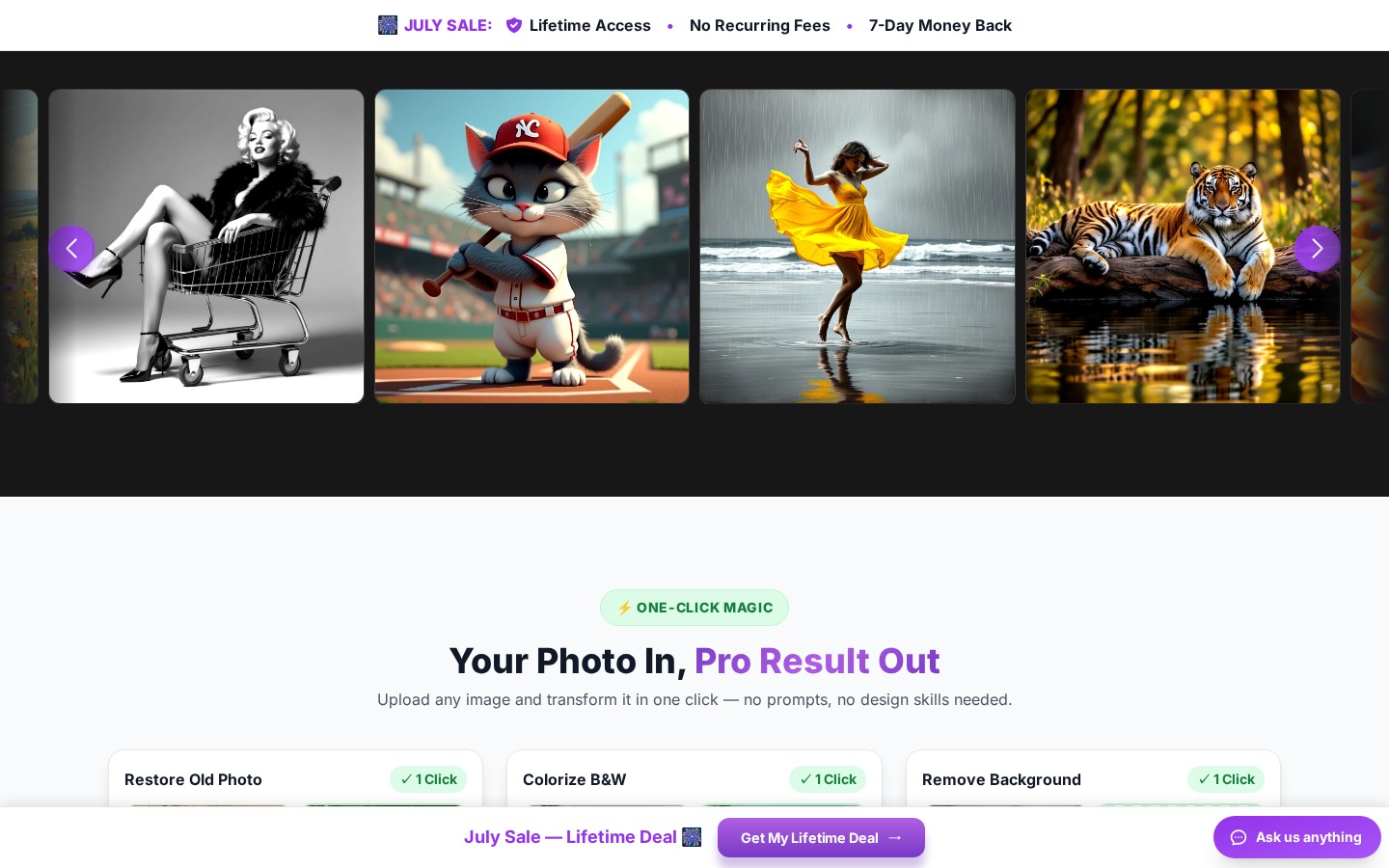
The tool library has grown way beyond the original set. Here’s a snapshot of what’s available now:
- New Image (Text-to-Image): Generate images from scratch with any prompt — the foundation of the platform.
- Upscale Image (4x): Boost resolution up to 4096×4096px with crystal-clear quality. Perfect for printing.
- Sharpen Pro: Fix blurry photos and enhance clarity with one click.
- Change Clothing: Swap outfits instantly — great for fashion previews or creative edits.
- Change Pose: Alter body positions as if you took a different photo entirely.
- Change Expression: Modify facial expressions — turn a frown into a smile in seconds.
- Change Hairstyle: Try on different hairstyles before committing to a cut.
- Change Scene: Teleport subjects into completely new environments.
- Change Rotation: See the same subject from a different angle.
- Change Age & Weight: See yourself older, younger, or with a different physique.
- Face Swap & Expression Transfer: Swap faces or copy expressions from one person to another.
- Makeup Artist: Apply or remove makeup with natural-looking results.
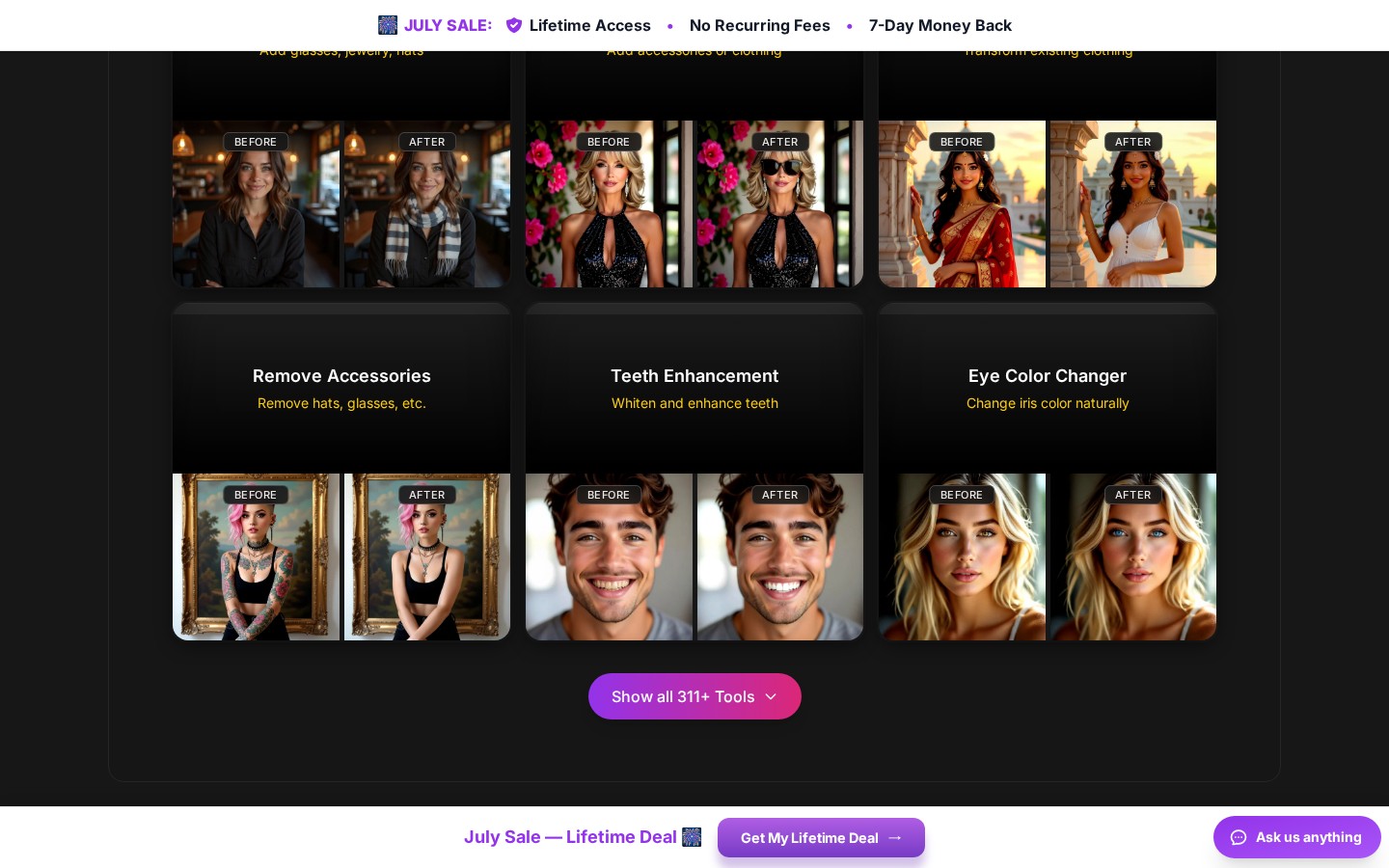
- Teeth Enhancement & Eye Color Changer: Subtle but powerful portrait refinements.
- Add/Remove Accessories: Add hats, glasses, jewelry, or remove them.
- Add Tattoo: Try out tattoo designs on your photos.
- Wedding Suit Try-On & Bouquet Try-On: Preview wedding looks before the big day.
- Combine 3 People: Merge three people into a single photo seamlessly.
- Background Removal: Isolate subjects with precision AI.
- Photo Restoration & Colorize B&W: Bring old family photos back to life.
And that’s still just scratching the surface — there are 311+ tools in total, and the team keeps adding more regularly. All of them are powered by the three engines and give you pro results in a single click.
Canvas Mode: Pro-Level Editing
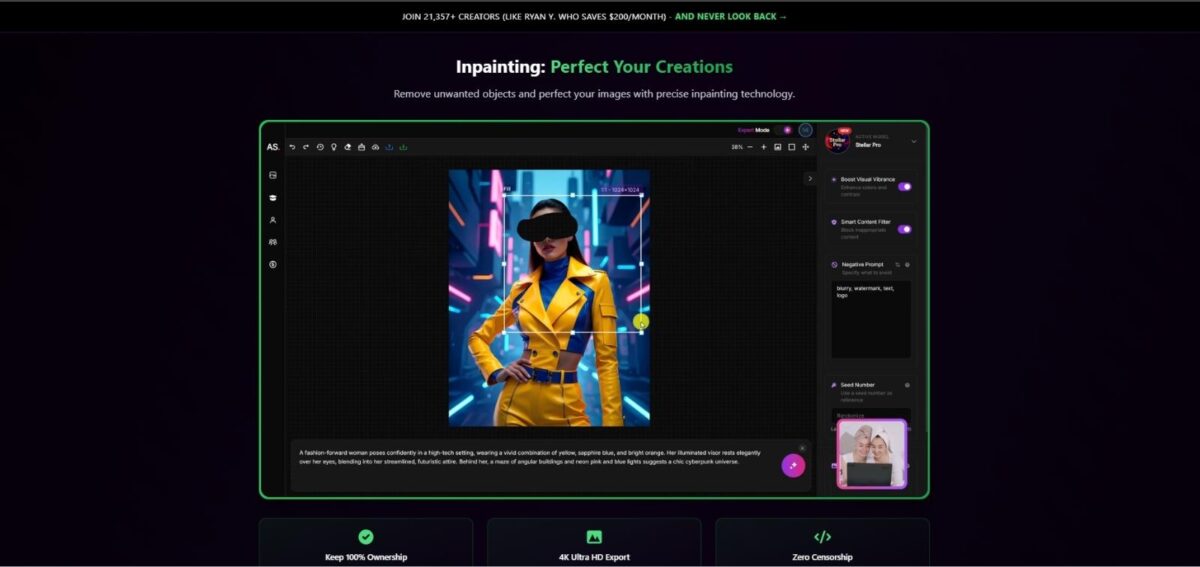
Beyond the one-click tools, ArtSpace now offers a full Canvas Mode (available on Pro and Unlimited plans). This is where things get really interesting for power users:
- Text to Image: Full prompt-based generation right inside the canvas.
- Inpainting: Select any area and regenerate or remove objects with precision.
- Outpainting: Extend your image beyond its original boundaries — great for expanding compositions.
- 4K Upscaling: Export at up to 4096×4096px resolution.
- Switch between AI models: Choose between Nova Ultra, Stellar Pro, and others on the fly.
- Full control over seeds & settings: Fine-tune every detail of your generation.
It’s essentially a full AI-powered photo editor, and it all runs in your browser — no downloads, no installations.
The Three Lifetime Plans — Which One Is Right for You?
This is the part I’m most excited about. ArtSpace now offers three different lifetime tiers, so you’re not stuck paying for features you don’t need — or missing out on the ones you do.
Here’s the breakdown of each plan:
🎯 Starter Lifetime — $59 (was $399) — 85% OFF
Best for: Casual users and photo editors who want the one-click tools without the complexity.
- ✅ 311+ One-Click Tools
- ✅ 300 images per month
- ✅ Commercial use included
- ✅ Lifetime access + all future updates
- ❌ Relaxed generation queue (non-peak only)
- ❌ No Canvas Mode
- ❌ No Storybooks / Power Chat / Character Studio
If you mainly want to restore old photos, remove backgrounds, upscale images, and change outfits or poses — this is all you need. At $59 once, it pays for itself in under two months compared to a $30/month subscription.
⚡ Pro Lifetime — $129 (was $899) — 86% OFF
Best for: Content creators, freelancers, and serious hobbyists.
- ✅ 311+ One-Click Tools
- ✅ 1,500 images per month — 5× the Starter for just $70 more
- ✅ Canvas Mode — Inpainting, Outpainting, full control
- ✅ Up to 4096×4096 4K resolution
- ✅ Premium AI models — switch between Nova Ultra, Stellar Pro, and more
- ✅ Full control over seeds, settings, and model selection
- ✅ Priority generation queue — full speed
- ✅ Storybooks ✨ (coming soon)
- ✅ Priority support
- ❌ No Power Chat / Character Studio
This is the sweet spot for most creators. Canvas Mode alone is a game-changer — being able to inpaint, outpaint, switch models, and export at 4K makes this a legitimate alternative to Photoshop + Midjourney + all the other tools in your stack.
∞ Unlimited Lifetime — $219 (was $1,799) — 88% OFF
Best for: Power users, agencies, and anyone who wants zero limits.
- ✅ Everything in Pro, plus…
- ✅ Unlimited images per month — never think about limits again
- ✅ Priority+ generation queue — fastest speed
- ✅ Power Chat ✨ (coming soon) — create and edit images by chatting with the AI
- ✅ Character Studio ✨ (coming soon) — keep consistent characters across all your images
- ✅ Priority+ support
If you’re generating images daily for client work, social media, or content at scale, the Unlimited plan removes every ceiling. Power Chat and Character Studio are going to be huge when they launch.
💡 Pro tip: You can start with a lower tier and upgrade later by paying only the difference — I’ve seen multiple users on Trustpilot mention this. So don’t overthink it, just get started!
The Smart Math: Pay Once vs Subscriptions
Let’s be honest — the real appeal here is the one-time payment model. Most AI image tools charge $30–$99 per month. That’s $360–$1,188 every single year, forever.
With ArtSpace’s lifetime deal:
- Starter at $59 — breaks even in under 2 months vs a $30/month tool
- Pro at $129 — breaks even in about 4 months vs Midjourney ($30/mo)
- Unlimited at $219 — less than 2 months of Photoshop + AI tools
After that, everything is free. Every update, every new tool, every new AI model — included in your original purchase. Over 21,000+ creators have already joined, and the platform holds a 4.9/5 rating on Trustpilot.
If you want to explore the plans and pick the one that fits: Check ArtSpace AI Lifetime Deals.
What’s Coming Next
ArtSpace isn’t stopping here. The roadmap includes some exciting features currently in development:
- Storybooks ✨ — Create illustrated storybooks with AI-generated characters and scenes. Coming to Pro & Unlimited.
- Power Chat ✨ — An AI chat assistant for image generation, built right into the platform. Unlimited only.
- Character Studio ✨ — Create and maintain consistent characters across multiple images. Unlimited only.
And the best part? These features will be included in your existing lifetime deal — no extra charges, no surprise upgrades.
How to Use ArtSpace AI (Quickstart)
- Start with a Prompt or Upload: Type a text description or upload an image.
- Pick a Tool or Open Canvas: Choose from 311+ one-click tools, or open the Canvas for advanced editing.
- Refine: Use inpainting/outpainting or switch between AI models to perfect the result.
- Download: Export at up to 4K resolution — ready for thumbnails, social media, print, or campaigns.
That’s it. The whole workflow is designed to be fast and frictionless — no complex masking, no switching between apps, no learning curve.
Final Thoughts
ArtSpace AI has come a long way since the original 89-tool launch. With 311+ One-Click Tools, multiple AI engines, professional Canvas Mode, and upcoming features like Storybooks and Character Studio, it’s genuinely evolving into a full creative suite — not just another AI image generator.
What makes it special is the lifetime access model. Every update — from Nano Banana to Nova Ultra to whatever comes next — is included in your original purchase. No upsells, no surprise fees, no subscription creep.
Whether you’re a casual user who just wants to restore old photos ($59 Starter), a creator who needs the full Canvas experience ($129 Pro), or a power user who wants zero limits ($219 Unlimited) — there’s a lifetime plan that pays for itself.
👉 Grab your ArtSpace AI Lifetime Deal here
and start exploring the full 311+ tool library today.
Also Read: Vidx Ai Review, discover niches and ideas for your Youtube faceless channel