Your booking link is often the first real thing a client sees of your business. If it looks like a generic calendar grid with a tiny logo in the corner, you are already blending in with every other consultant, coach, or agency out there. TimeTuna exists to fix exactly that. It builds branded scheduling pages with video backgrounds, custom domains, and real-time calendar sync, so the page you share feels like an extension of your brand instead of a utility screen.
This TimeTuna review covers what the tool actually does, walks through the key features that matter, breaks down the AppSumo lifetime deal in detail, and gives you a balanced verdict on whether it deserves a spot in your stack. I tested the product flow, read the docs, and compared it against the scheduling tools most people already use.
Key Takeaways
- TimeTuna builds booking pages that feel like your brand, with video backgrounds, logos, avatars, and your own domain.
- It handles scheduling basics properly: two-way Google and Microsoft sync, automatic meeting links, and cross-timezone availability.
- The AppSumo deal gives lifetime access from $49 for one seat, with Stripe payments and full logo branding starting at $99.
- Round robin and multi-host pages make it useful for small teams and agencies, not just solo operators.
- It is a young product with a small review base, so the cheaper price comes with a less proven ecosystem than Calendly or Cal.com.
What Is TimeTuna?
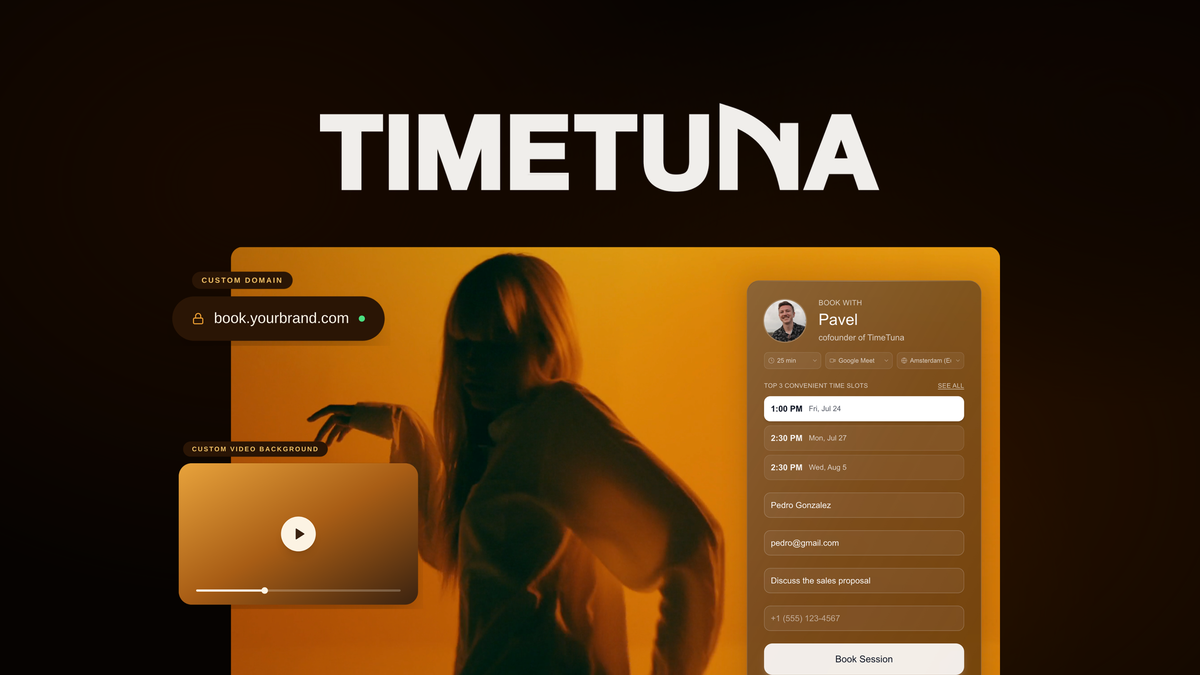
TimeTuna is a scheduling platform founded in May 2024 in Amsterdam, Netherlands. It is a bootstrapped startup with a small team, led by co-founder Pavel Kucherbaev, and its positioning is simple: “If Calendly was as beautiful as WeTransfer.” Instead of showing guests a bare calendar grid, TimeTuna serves a full-screen booking page with your logo, an avatar, brand colors, and even a video background, all hosted on your own domain.
The booking flow works the way you would expect from a modern scheduler. Guests open your link, see your availability converted to their own timezone, pick a meeting duration, answer any custom questions you added, and book. Behind the scenes, TimeTuna syncs your calendars in real time, generates Google Meet, Zoom, or Teams links automatically, sends confirmations and reminders, and can take Stripe payments before a slot is confirmed. What sets it apart is the design-first approach: the booking page itself is the product.
Key Features
Branded Booking Pages With Video Backgrounds
The headline feature is the page design. You can set an image, video, or YouTube background, upload a logo and avatar, choose layout positions and colors, and the result renders as a full-screen branded experience. Everything is built mobile-first, which matters because TimeTuna says roughly 70% of guests book from a phone. There is no other mainstream scheduler where a full video background is a first-class feature rather than a hack.
Custom Domains and Website Embedding
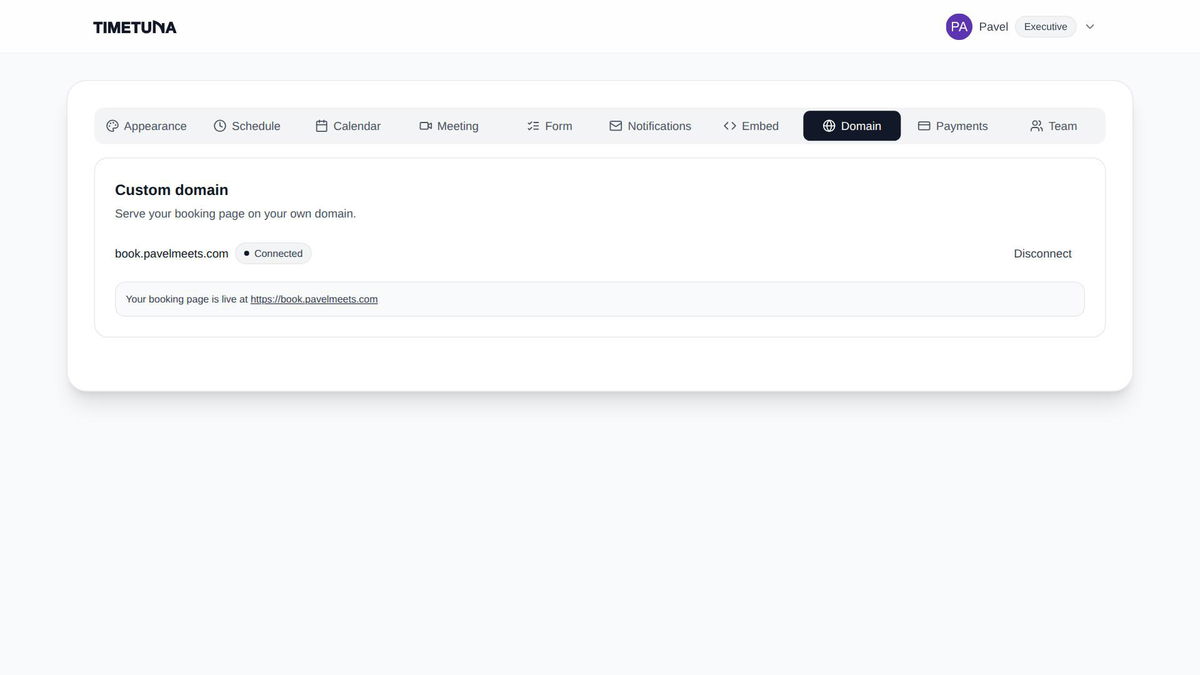
Every tier includes custom domains, which is rare in this category. You can serve your booking page from a subdomain like book.yourcompany.com or a root domain, with automatic HTTPS. The editor shows the exact DNS record to add with a copy button, and a domain check confirms propagation. You can also embed the scheduler on any existing page (WordPress, Webflow, Squarespace, Notion, or anything that accepts an iframe) with several style presets, so guests never feel like they left your site.
Calendar Sync and Automatic Meeting Links
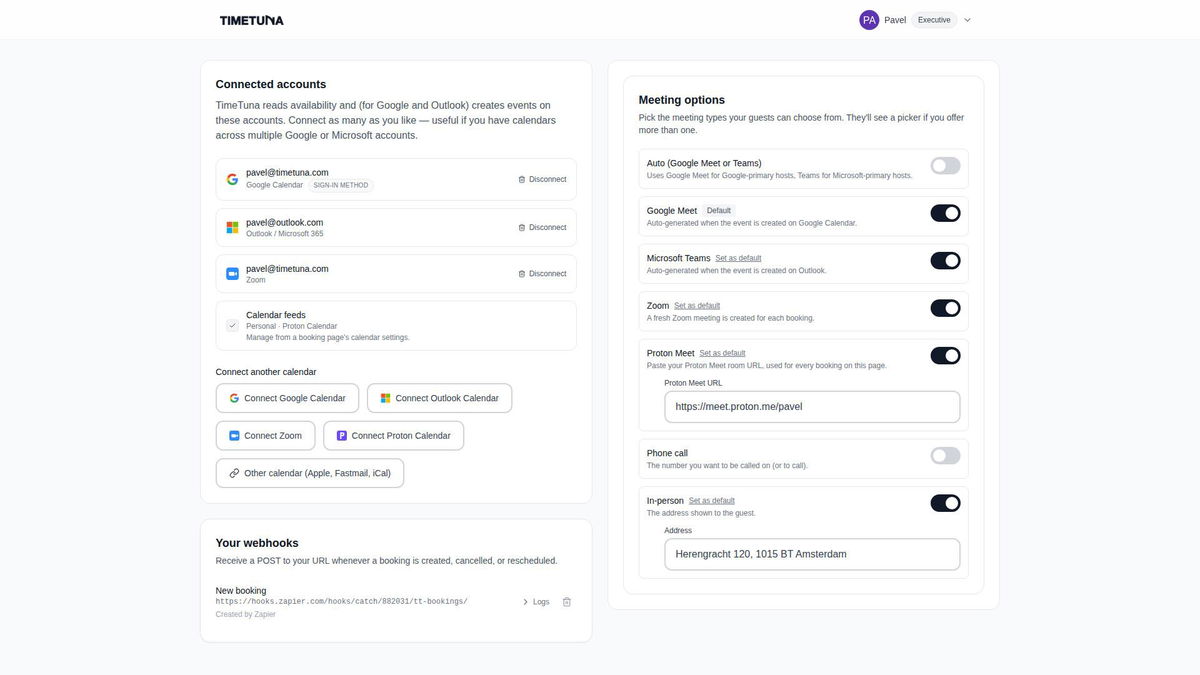
TimeTuna syncs Google Calendar and Microsoft 365 and Outlook with real-time two-way sync, and reads any iCal feed for busy blocking, which is how Proton and Apple shared calendars connect. For every booking it auto-generates a Google Meet, Microsoft Teams, or Zoom link and adds it to both calendar invites, so nobody has to set up a call manually. Proton Meet and any custom link work without any connection at all. That covers the four calendar ecosystems most businesses actually live in.
Multiple Durations and Custom Form Fields
You can offer several meeting lengths on a single page, for example a free 15-minute intro plus a paid 60-minute session, and guests pick the format that fits. Availability rules apply across all durations, so a 60-minute slot only shows where 60 free minutes actually exist. Custom questions on the booking form let you collect context before the meeting, and you can set separate availability per booking page, which keeps different meeting types on their own terms.
Paid Bookings With Stripe
On the higher tiers you connect your own Stripe account and charge per meeting. The slot is only confirmed after payment clears, which means unpaid holds never block your calendar and no-shows stop costing you. Funds settle directly to your Stripe account; TimeTuna does not hold money or add its own fee on top of standard Stripe processing. If you want a free intro call and a paid deep-dive on the same page, create two booking pages, because all durations on one page share the same price.
Top 3 Slot Recommendations
Instead of dumping the full calendar grid on guests, TimeTuna can offer just three times. You pick the rule that chooses them: soonest available, the start or end of your day, right next to your existing meetings, or spread across the week. AppSumo describes these as AI-driven recommendations, and in practice the rule engine does a good job of reducing decision fatigue. Fewer choices usually means faster bookings.
Round Robin and Multi-Host Pages
TimeTuna covers two separate team needs. Teammates can share and edit booking pages inside one license (Tier 2 and above). Cohosts are the people actually on the meeting: in group mode the page only offers slots where every cohost is free and invites all of them, while in round-robin mode each booking goes to whichever host has the fewest recent bookings. Every host keeps their own weekly hours in their own timezone, which is what makes cross-timezone round robin work correctly.
Custom Emails, Reminders, and SMS
Every booking sends a confirmation, and email reminders go out before the meeting. You can rewrite the confirmation, 24-hour reminder, reschedule, and cancellation emails per booking page, editing subject, body, and reply-to with placeholders, a live preview, and test sends. For SMS, you connect your own Twilio account and messages go out from your own number, included on every tier, with no per-message fee from TimeTuna.
Webhooks and Zapier Automation
Webhooks trigger your own workflows whenever a booking is made, changed, or cancelled, and the Zapier integration is live in the Zapier marketplace, connecting TimeTuna to thousands of apps. This is where the tool punches above its price: automation hooks are not locked behind the most expensive plan like they are with some competitors. You can push new bookings into your CRM, sheet, or campaign list without any manual copying.

Pros and Cons
What I Like
- Booking pages look dramatically more polished than a default Calendly grid.
- Custom domains, video backgrounds, and custom form fields are included on every AppSumo tier.
- Real two-way calendar sync prevents double-bookings across Google and Microsoft.
- Stripe payments are built in, and slots only confirm after payment clears.
- Round robin and group scheduling work across timezones with per-host hours.
- Webhooks, Zapier, and Twilio SMS are available even on the entry tier.
- The AppSumo deal has a 60-day money-back guarantee.
What Could Be Better
- The company is young and the review base is small (3 AppSumo reviews at the time of writing), so long-term support and roadmap are less proven.
- The $49 tier keeps a “Made with TimeTuna” mark; removing it costs $99 or more.
- Fewer native integrations than Calendly or Cal.com; there are no out-of-the-box CRM connectors yet.
- The AppSumo deal is only for brand-new users, and the white-label plan on the official site is expensive at EUR 1200 per year.
Pricing and AppSumo Deal
On the official site, TimeTuna offers a Free plan (image and video backgrounds, unlimited booking pages, email confirmations, embed), Pro at EUR 60 per year (custom branding, custom domain, multi-host pages, round robin), and Executive at EUR 120 per year (team sharing up to 6 people, Stripe payments, SMS via Twilio, webhooks and Zapier, personal support from the founders). There is also a white-label plan for agencies at EUR 1200 per year, set up on a call rather than through checkout.
The AppSumo lifetime deal is the interesting one. It maps Tier 1 to the Pro plan and Tiers 2 and 3 to the Executive plan, with all future updates included. Every tier gets unlimited booking pages, any visual background, top 3 slot recommendations, multiple calendars, automatic meeting links, custom form fields, round robin, custom domains, webhooks, Zapier, and SMS through your own Twilio account.
| AppSumo tier | Price | Seats | Stripe payments | Branding | Best for |
|---|---|---|---|---|---|
| Tier 1 | $49 lifetime | 1 | No | “Made with TimeTuna” mark | Solo consultants and coaches |
| Tier 2 (recommended) | $99 lifetime | 3 | Yes | Your own logo | Small teams and studios |
| Tier 3 | $199 lifetime | 10 | Yes | Your own logo | Growing agencies |
Deal terms are standard but worth reading: lifetime access, brand-new users only (no previous accounts or trials), activate within 60 days of purchase, upgrade while the deal is live, downgrade within 60 days of purchase, and a full 60-day money-back guarantee. As with most AppSumo deals, future AI features may be offered at a discounted rate or as a paid add-on. You can see the current TimeTuna AppSumo deal and full tier details on the listing before you commit.
Who Is It Best For?
TimeTuna is not trying to be the most feature-dense scheduler on the market. It is aiming at people who care how their booking link looks and who want a professional first impression without paying enterprise prices.
A Great Fit If You
- Run a consulting, coaching, or therapy practice and want premium-looking booking pages.
- Charge for sessions or discovery calls and want payments taken before a slot is confirmed.
- Serve your booking link from your own domain to keep clients inside your brand.
- Run a small agency that routes calls across multiple hosts in different timezones.
- Feel embarrassed sharing a generic Calendly grid and want a page guests actually remember.
Look Elsewhere If You
- Need deep native CRM or pipeline integrations out of the box.
- Manage a large team that depends on a mature admin and approval workflow.
- Only need a free basic scheduler and do not care about page design.
- Want to resell scheduling under your own brand without paying for the white-label tier.
Is TimeTuna Worth It?
On value, the math is fairly simple. A $49 lifetime license replaces a Pro plan that costs EUR 60 per year on the official site, so the deal pays for itself within the first year for anyone who books clients regularly. The $99 tier adds Stripe payments and your own logo, which is where the tool becomes genuinely useful for paid services. Against Calendly, whose paid plans are billed per user per month, TimeTuna is significantly cheaper over two or three years.
The honest caveat is that TimeTuna is a design-first product from a young bootstrapped company. It has a smaller feature surface than Calendly or Cal.com, fewer third-party integrations, and a small review base to judge support from. If your business depends on complex scheduling automation, that risk matters. If you mainly need a beautiful, reliable booking page with payments, reminders, and team routing, the lifetime deal is a compelling buy at this price.
Alternatives
Calendly
Calendly is the market leader and the safest choice if you need mature workflows, lots of native integrations, and a huge install base. It offers a free plan and paid tiers per user per month (see Calendly pricing). The trade-off is presentation: custom branding and a less generic look cost extra, and the pages never come close to TimeTuna’s video-background design.
Cal.com
Cal.com is the open-source alternative that developers love. You can self-host it, customize almost anything, and connect it to a huge ecosystem of apps. The flexibility comes at a cost: setup is more technical, and the out-of-the-box design is plainer. If you are happy to configure things yourself, Cal.com gives you more control, while TimeTuna wins on polish with far less effort.
SavvyCal
SavvyCal is a clean, simple scheduler aimed at individuals and freelancers who want an elegant booking experience without a steep learning curve. It is pleasant to use and has a loyal following, but it offers fewer branding options than TimeTuna and its team scheduling is more limited. For pure page beauty and full branding control, TimeTuna goes further.
If you also run paid virtual events alongside one-on-one scheduling, check out my HeySummit review, which covers a dedicated platform for event scheduling and ticketing. And for a broader view of all-in-one business software that includes booking and client management, my SuiteDash review is worth a read.
Final Verdict
Buy TimeTuna if you want a branded booking page that looks nothing like the default grid, and you value a one-time price that includes custom domains, video backgrounds, Stripe payments, and team routing.
Skip it if you need a proven enterprise ecosystem, deep CRM integrations, or you genuinely do not care how your booking page looks. In that case the free tiers of Calendly or Cal.com cover the job.
For consultants, coaches, founders, and small agencies that care about first impressions, TimeTuna is one of the most distinctive scheduling deals on AppSumo right now.
Frequently Asked Questions
What is TimeTuna and who is it for?
TimeTuna is a scheduling platform that creates branded booking pages with video backgrounds, custom domains, and real-time calendar sync. It is aimed at consultants, coaches, founders, and small agencies that want a professional first impression for every client meeting.
Is TimeTuna really free?
Yes, TimeTuna has a genuine free plan with image and video backgrounds, unlimited booking pages, calendar sync, and email confirmations. Paid plans add custom domains, custom branding, multi-host pages, payments, SMS, and automation. The AppSumo lifetime deal replaces a paid plan for a one-time price.
What does the TimeTuna AppSumo deal include?
The deal gives lifetime access on three tiers: $49 for 1 seat, $99 for 3 seats, and $199 for 10 seats. Every tier includes unlimited booking pages, video backgrounds, custom domains, round robin, webhooks, Zapier, and Twilio SMS. Tier 2 and above add Stripe payments and your own logo. It is for new users only, must be activated within 60 days, and is refundable for 60 days.
Does TimeTuna integrate with Google Calendar?
Yes. TimeTuna syncs Google Calendar and Microsoft 365 and Outlook with real-time two-way sync, and reads any iCal feed for busy blocking. It also auto-generates Google Meet, Microsoft Teams, or Zoom links for every booking.
Can I charge clients for bookings with TimeTuna?
Yes, on Tier 2 and above. You connect your Stripe account, set a price and currency per booking page, and guests pay during booking. The meeting is only created after payment clears, and funds settle directly to your Stripe account with no TimeTuna fee on top.
How does TimeTuna compare to Calendly?
Calendly has a bigger feature set, more integrations, and a mature ecosystem. TimeTuna wins on page design, with full video backgrounds and branding included at every tier, plus a lifetime pricing model on AppSumo instead of a monthly fee. For brand-conscious solo professionals and small teams, TimeTuna is the more distinctive option; for complex automation needs, Calendly remains safer. You can learn more about the company and its approach on the official TimeTuna website.