Finishing a book used to mean juggling five or six different tools. You draft in one app, outline in another, chase a cover designer, then struggle through EPUB formatting and KDP metadata on deadline. AIWriteBook tries to compress all of that into a single AI workspace. This AIWriteBook review breaks down how the platform works, what it delivers, and whether the AppSumo lifetime deal is worth your money.
AIWriteBook is an all-in-one AI book writing platform for authors, freelancers, and solopreneurs who want to go from idea to published book faster. It writes chapters in your voice, generates covers and illustrations, produces audiobook narration, and exports KDP-ready files. The strongest point is voice training: upload your own writing and the AI adapts to your style instead of returning generic prose. I’ll cover the features, pricing tiers, pros and cons, and who should buy it.
Key Takeaways
- All-in-one pipeline: outlines, chapters, covers, formatting, audiobooks, and export live in one tab, replacing several separate tools.
- Voice-matched writing: upload previous work so chapters sound like you, not generic AI output.
- KDP-ready output: export EPUB, PDF, and DOCX with built-in keyword research, blurbs, and category selection.
- Credit-based pricing: the AppSumo lifetime deal starts at $79 for 500 credits per month, with higher tiers for power users.
- Best for: authors who want control over the whole book pipeline, from first idea to published listing.
What Is AIWriteBook?
AIWriteBook is an AI book writing assistant from a London-based team founded at the end of 2025. It was built by authors who were tired of AI tools that produce generic, forgettable prose. The platform handles the full book journey: you start with an idea or an imported draft, the AI builds a detailed outline, writes chapters, designs covers and illustrations, converts the finished book to an audiobook, and exports a print-ready file. You can read more on the official AIWriteBook website.
What makes it different is the focus on your voice. Upload manuscripts you have already written and the AI learns your characters, pacing, dialogue style, and chapter rhythm. The company reports that more than 1,300 authors pay for the tool, with 50,000+ books written so far and a 4.6 Trustpilot rating. It works for fiction, nonfiction, book series, and illustrated children’s books, and supports 30+ languages. That is a very different approach from general AI writing workspaces like Scribeist, which focus on broader content and copywriting.
Key Features
Write in Your Voice
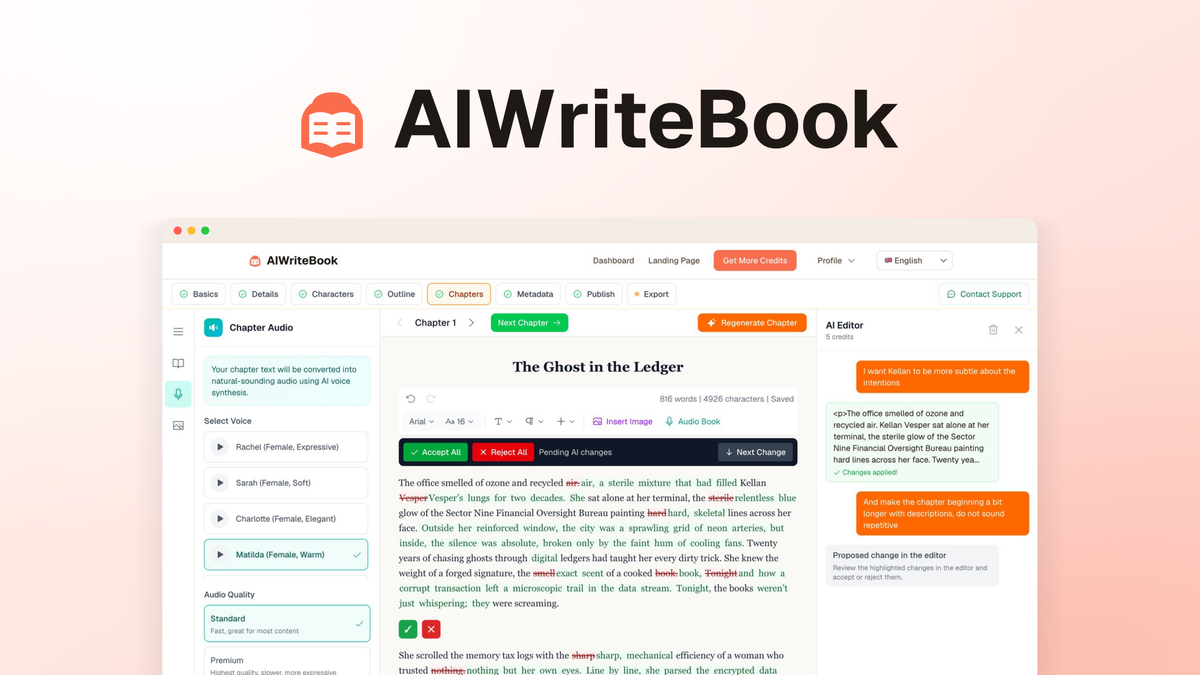
The headline feature is voice training. Upload your previous books or drafts and the AI learns your style, so every chapter it generates matches that voice instead of sounding flat and generic. You can edit any paragraph inline or regenerate weak sections without starting over. This matters most for authors who publish under their own name and need consistent quality across a series.
Build Your Book From the Ground Up
The character builder lets you develop full characters with arcs, backstory, and traits. The outline builder works for fiction and nonfiction, and you keep full control to edit or regenerate any section. For nonfiction, you can add references and citations to structure research-backed books. This is a strong fit for coaches and experts turning their knowledge into a book.
Illustrate Every Page
AIWriteBook generates chapter illustrations that stay visually consistent across every page, and a cover designer produces unlimited variations until you find the right look. Rendering illustrations alongside your text in the same workspace is a big time-saver for children’s book creators, cookbook authors, and anyone producing visual books. Consistent character visuals are usually the hardest part of AI illustration, and this is where the tool shines.
KDP-Ready Export
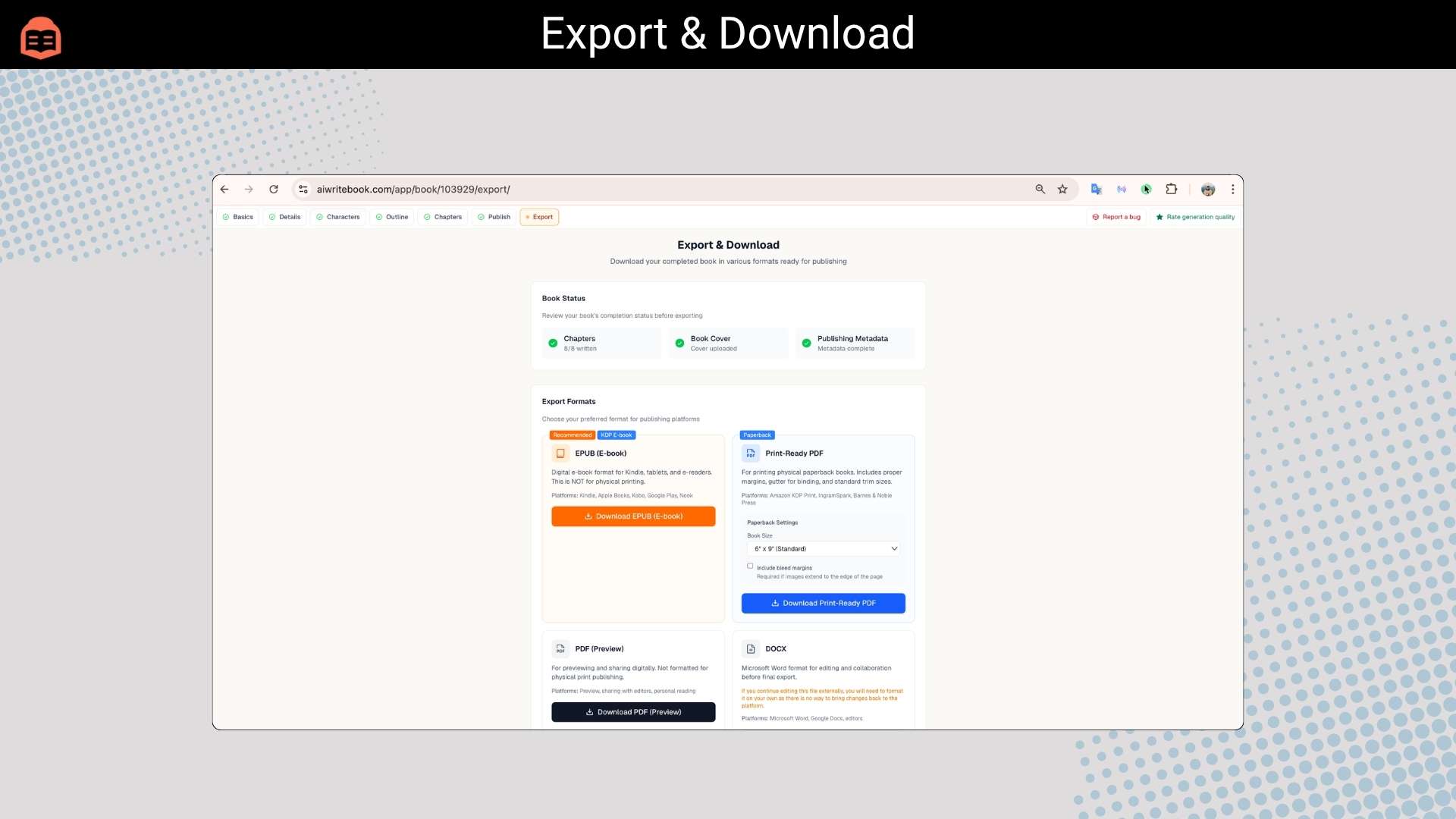
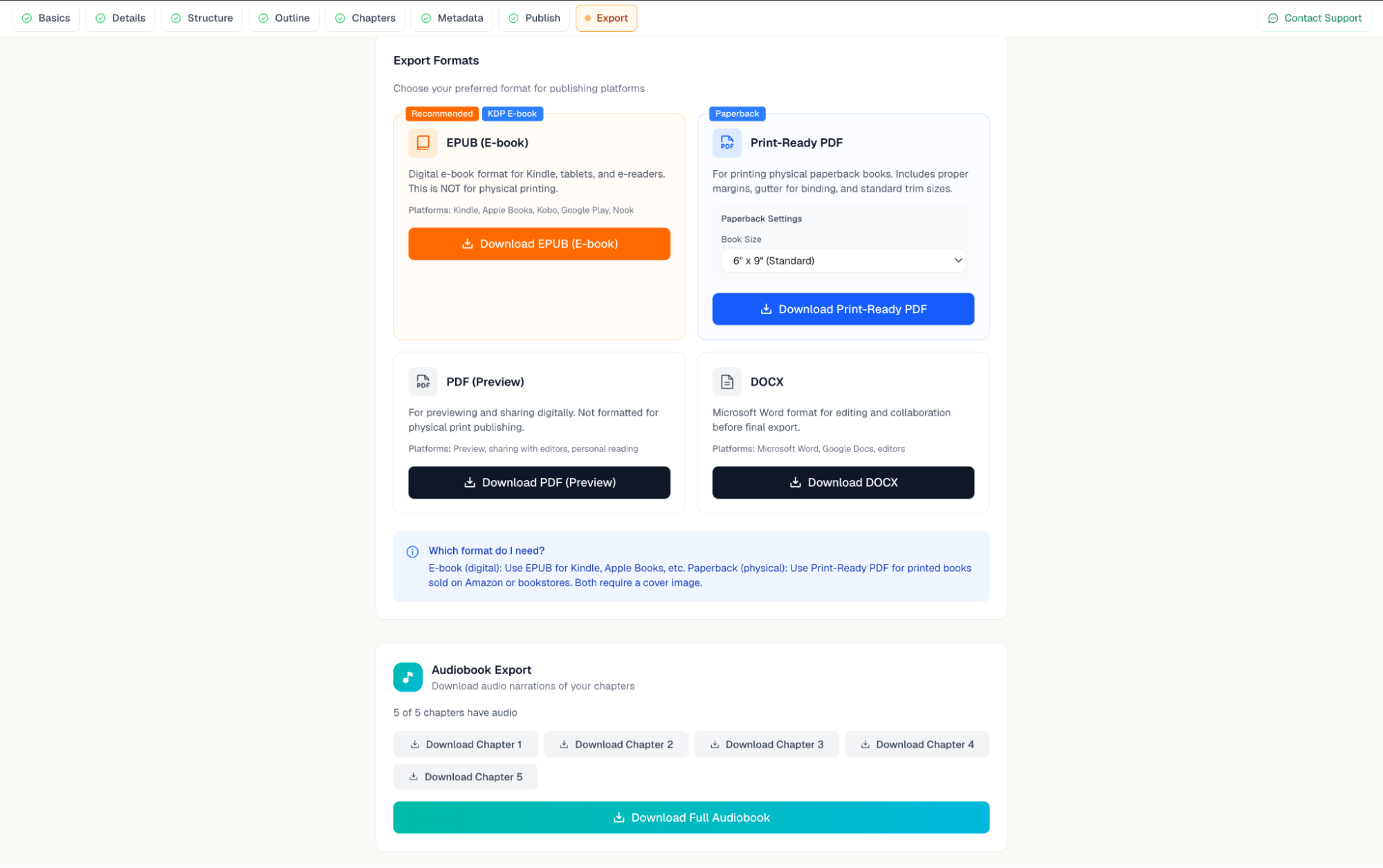
You can ship EPUB, PDF, and DOCX files with one-click export to Amazon KDP, Apple Books, Kobo, and more. The built-in KDP metadata tool handles keyword research, blurb generation, and category selection, so you do not need a separate publishing tool. For self-publishers, this removes several manual steps from the release process. The tradeoff is that advanced formatting control is more limited than a dedicated tool like Scrivener.
Audiobook Narration and Translation
Finished books can be converted into professional audiobooks with natural-sounding narration in 30+ languages, ready for ACX or Findaway. You can also write natively in any supported language or translate finished books to reach new KDP markets. This is a meaningful differentiator, since most writing tools stop at the manuscript and leave audio and localization to separate services.
Author Page and Distribution
AIWriteBook gives you a public author page with your bio, every cover, blurbs, and buy links. A free-chapter funnel turns visitors into subscribers by letting them read chapter one for free and trade their email to continue; you own those emails and can export them to CSV. One-click cross-publishing to NanoReads, the company’s own reader platform with over 100,000 readers, adds a second discovery surface and earns you credits when someone reads your book.
Pros and Cons
Pros
- Keeps the whole book pipeline in one workspace, replacing 5 to 7 separate tools.
- Voice training produces chapters that sound like your own writing, not generic AI.
- KDP keywords, blurbs, categories, and export are built in, saving real setup time.
- Audiobook narration and translation in 30+ languages are included.
- You can import existing drafts in most common formats and continue where you left off.
- Full commercial rights: everything you create is yours to sell.
Cons
- Credit-based pricing means heavy writing or image generation consumes credits quickly.
- Advanced long-form formatting is less flexible than dedicated tools like Scrivener.
- AI output still needs your editing to avoid consistency issues over very long manuscripts.
- Access to future AI models may require an add-on or discounted rate.
- It is a young product, so the feature set is still evolving.
Pricing and AppSumo Deal
You can grab the current AppSumo offer for lifetime access to AIWriteBook, with a 60-day money-back guarantee. The price increases in a few days, and there are four license tiers. The main difference between tiers is the number of monthly credits you get. Every action costs credits: chapter outlines are 3 credits, a full chapter runs 15 with Gemini, 20 with Grok, or 30 with Claude, and images cost 15 to 30 credits depending on type.
| Tier | Price | Credits per Month | Best for |
|---|---|---|---|
| Tier 1 | $79 | 500 | Casual Authors writing one or two books |
| Tier 2 | $159 | 1000 | Regular publishers |
| Tier 3 | $299 | 2500 | Prolific authors (recommended) |
| Tier 4 | $499 | 5000 | Small publishers and teams |
All tiers include audiobook generation, an author page, NSFW and book series support, visual books, translation, BYOK, NanoReads distribution, the character and outline builders, voice style training, 30+ languages, references and citations, manuscript import, the chapter chat assistant, grammar and style checks, illustration generation, the cover designer, and the KDP export and metadata tool. Future Plus and Pro plan updates are included, and if the plan name changes it transfers automatically.
For most solo authors, Tier 1 at $79 is a reasonable entry point, but heavy users who generate lots of illustrations or long chapters will feel the 500-credit cap quickly. If you plan to publish several books a month, the higher tiers are worth the extra cost. The AppSumo deal is a strong value compared to the tool’s regular subscription pricing.
Who Is It Best For?
Good fit
- KDP publishers who want to replace a stack of separate writing, formatting, and design tools.
- Prolific authors who need consistent voice and series continuity across many books.
- First-time authors who want a guided step-by-step path from idea to published book.
- Coaches, consultants, and experts turning existing notes and content into structured nonfiction.
- Children’s book creators who need consistent character illustrations alongside the text.
Look elsewhere
- Writers who want a pure distraction-free drafting tool with maximum formatting control, like Scrivener.
- Teams that need deep real-time collaboration and version control across many users.
- Anyone who dislikes credit-based usage limits and prefers flat unlimited pricing.
Is AIWriteBook Worth It?
For authors who want to compress the entire publishing workflow into one tool, yes. Voice-matched writing, built-in covers, audiobook conversion, and KDP-ready export are genuinely useful, and most writing tools stop long before the publishing stage. The credit system is the main limitation: it is easy to burn through credits on illustrations and long chapters, so you need to budget based on how much you actually produce.
AIWriteBook is not the right choice for everyone. If you only write occasionally and want a simple drafting app, the credit model is overkill. But if you publish regularly and are tired of paying for five separate tools, the AppSumo deal offers strong value. It is a young product, so expect the feature set to evolve, and factor in that access to future AI models may cost extra. If you are also building your content workflow, our TaskMagic review covers automation ideas for busy creators.
Alternatives
Scrivener
Scrivener is the classic choice for long-form writing and offers deep organizational and formatting control. It does not generate content with AI, so it is better for writers who want complete manual control over their manuscript and do not need covers, audiobooks, or publishing automation.
Sudowrite
Sudowrite is a well-known AI writing assistant for fiction. It excels at brainstorming and scene-level assistance but does not offer full book generation, covers, audiobooks, or KDP export in one place. It is a strong companion tool rather than a complete publishing pipeline.
NovelAI
NovelAI focuses on creative fiction and short-form writing with strong storytelling models. It lacks the outline builder, book covers, formatting, and publishing tools that AIWriteBook bundles together, so it suits writers focused purely on the creative draft rather than the full release process.
Final Verdict
Buy it if you are a self-publisher or prolific author who wants one tool to handle writing, covers, audiobooks, and KDP export. The voice training is the standout feature, and the bundled publishing tools genuinely save time and money.
Skip it if you only write occasionally, need maximum manual formatting control, or dislike credit-based usage limits. The 500-credit entry tier is limiting for heavy users, so plan your tier choice before you buy.
Frequently Asked Questions
What is AIWriteBook?
AIWriteBook is an all-in-one AI book writing platform that helps authors go from idea to published book. It writes voice-matched chapters, generates covers and illustrations, produces audiobook narration, and exports KDP-ready files from one workspace.
How does the AIWriteBook AppSumo deal work?
The AppSumo deal gives you lifetime access with a 60-day money-back guarantee. There are four tiers from $79 to $499, and the main difference is monthly credits. All future Plus and Pro plan updates are included while the deal is active.
How many credits do I need to write a book?
Credits depend on the model and action. Chapter outlines are 3 credits, a full chapter is 15 with Gemini, 20 with Grok, or 30 with Claude, and images cost 15 to 30 credits. A typical full book requires several hundred credits, so pick a tier that matches your output.
Can AIWriteBook match my writing style?
Yes. Upload your previous books or manuscripts, and the AI learns your characters, plot, pacing, dialogue style, and chapter rhythm so generated chapters sound like you rather than generic AI output.
Can I import an existing manuscript?
Yes. AIWriteBook lets you upload existing manuscripts, notes, or partial drafts in formats like .doc, .docx, .pdf, .epub, .rtf, .txt, or .md, and the AI continues from where you left off.
What export formats does AIWriteBook support?
You can export finished content in EPUB, PDF, and DOCX formats, ready for publishing on Amazon KDP, Apple Books, Kobo, or for printing. The KDP metadata tool also handles keywords, blurbs, and categories.