Manual data entry from invoices, purchase orders, bank statements, and shipping documents is one of those tasks that eats up hours every week without adding any real value. If you’ve ever found yourself copy-pasting the same fields from dozens of PDFs into a spreadsheet, you know exactly how tedious and error-prone it gets — just like the repetitive workflows that AI automation tools can eliminate.
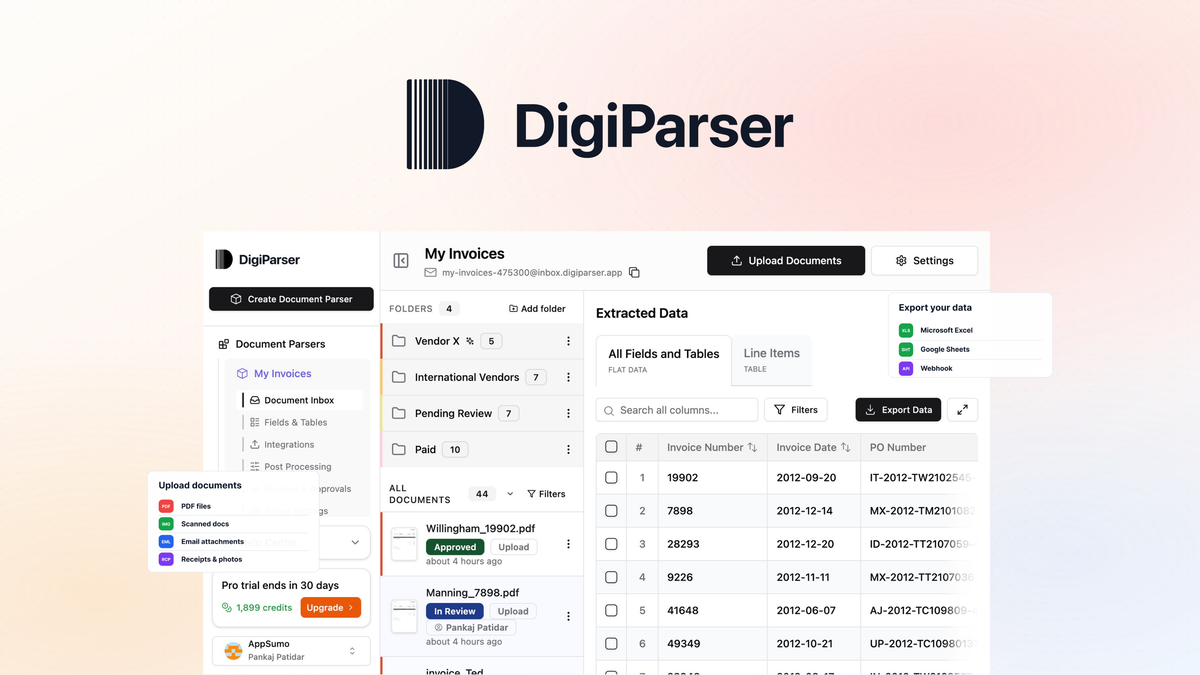
DigiParser is an AI-powered document extraction platform that turns this around. It reads PDFs, images, and email attachments, pulls out the structured data you need, and sends it straight to your spreadsheet, accounting software, or any other tool. No templates, no training, no manual setup. In this DigiParser review, I’ll walk through every feature, the AppSumo lifetime deal for DigiParser tiers, pros and cons, and who should buy it.
Key Takeaways
- DigiParser extracts structured data from invoices, POs, receipts, bank statements, and any other document, no templates or training required.
- It processes documents via upload, email forwarding, API, or embeddable widget, and exports to CSV, Excel, JSON, Google Sheets, Xero, QuickBooks, and more.
- The AI automatically detects schemas and fields, so you don’t need to configure anything for common document types.
- AppSumo offers lifetime access starting at $69 for 100 pages per month, scaling up to 2,000 pages per month at $469.
- It’s best suited for freelancers, small businesses, and teams dealing with recurring document processing, especially in accounting, freight, and manufacturing.
What Is DigiParser?
DigiParser is an intelligent document processing platform that uses AI to extract structured data from documents. Instead of building templates or training models for each document type, you upload your files or forward them via email, and DigiParser automatically identifies the fields, extracts the values, and organizes them into clean rows.
The tool was founded in January 2024 by a bootstrapped team based in Indore, India. It was built specifically to solve the frustration of manually processing invoices, receipts, contracts, and other business documents that come in different formats from different sources. The founders wanted something that worked out of the box without requiring technical setup or template configuration.
What sets DigiParser apart from older OCR tools is its AI-first approach. It doesn’t just scan text, it understands the context. It knows that a date field on an invoice is different from a date field on a bank statement. It automatically detects schemas, identifies line items, and handles multi-page documents without breaking a sweat. The company claims 99.7% extraction accuracy, which puts it in the same league as enterprise-grade solutions like Rossum and Nanonets but at a fraction of the cost.
Key Features
Bulk Document Processing With Queue Management
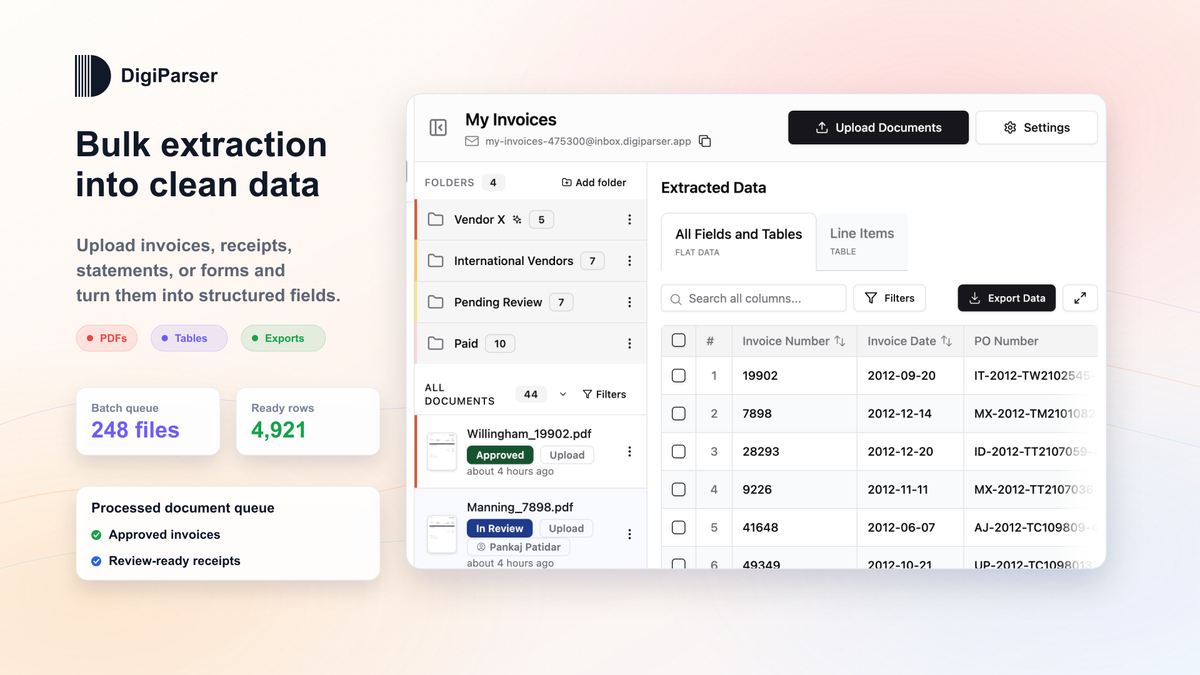
DigiParser handles bulk uploads of invoices, receipts, POs, and more. You can drag and drop a folder of files or upload them one by one. The processing queue shows the status of every file in the batch, so you always know what’s been extracted, what’s pending, and what needs review. This is a huge time-saver if you receive dozens or hundreds of documents per week.
Once processed, you can export the results as CSV, Excel, or JSON. The data lands in a format your accounting software, ERP, or spreadsheet can immediately use, no manual reformatting needed.
AI-Powered Schema Detection
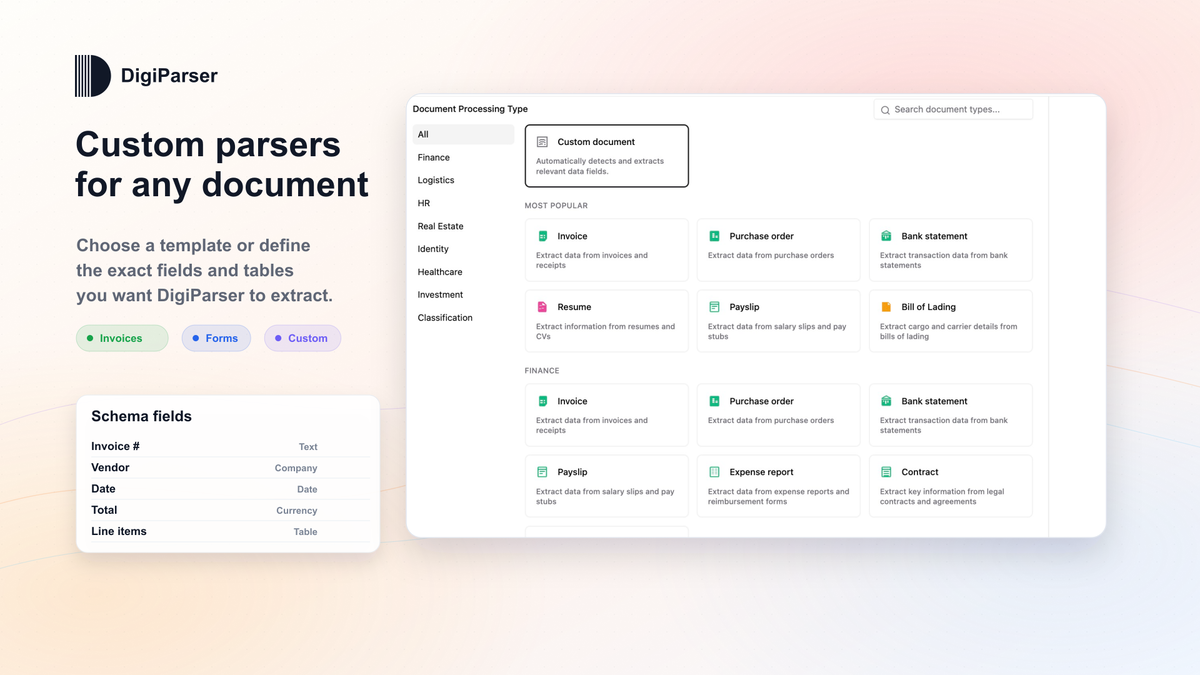
This is the feature that makes DigiParser stand out. Instead of building a parser template for each document format, you upload a file and let the AI figure out the structure. It automatically detects fields like vendor name, invoice number, date, line items, totals, and tax amounts. You can also define custom fields and tables for any document type if the AI doesn’t catch everything on the first pass.
Pre-built templates are available for common documents like invoices, bank statements, and resumes. But even without a template, the AI does a solid job of identifying what’s important. And as you process more documents, you can refine the parser with AI suggestions to improve accuracy on new variations.
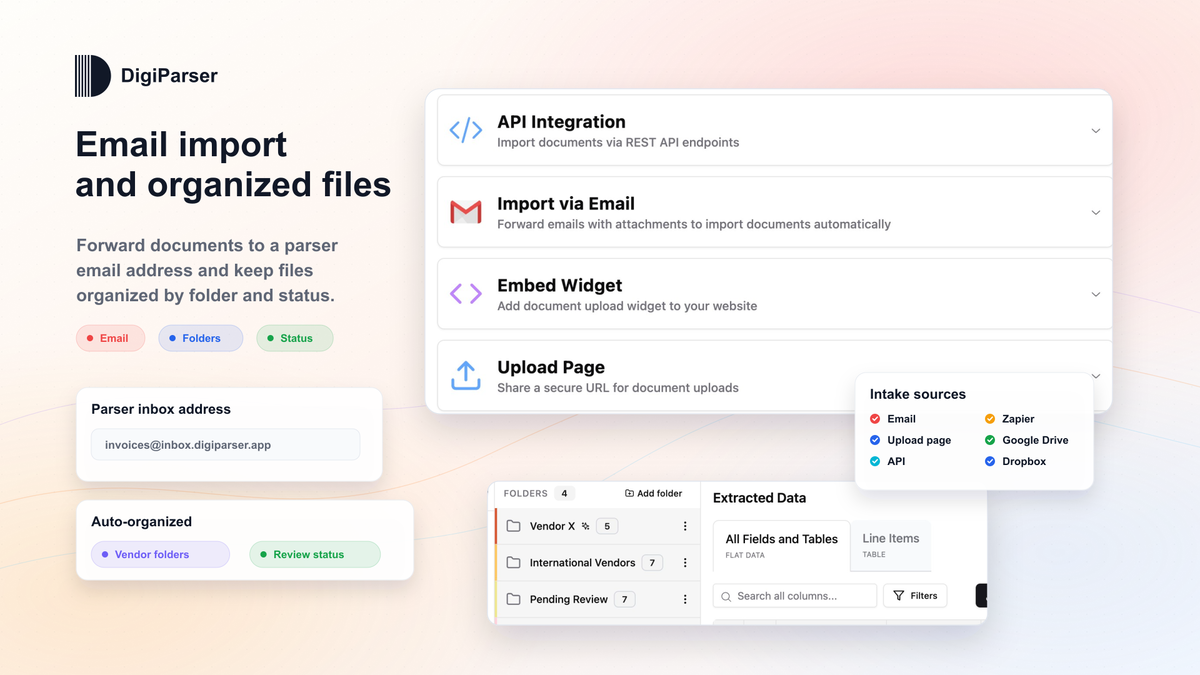
Multiple Document Ingestion Methods
DigiParser gives you four ways to get documents into the system:
- Direct upload – drag and drop files through the web interface.
- Email forwarding – send documents to a dedicated inbox address, and they get processed automatically.
- API – integrate DigiParser into your own application or workflow.
- Embeddable widget – let clients or team members submit documents from your own website.
This flexibility means you can use DigiParser whether you’re processing documents internally, receiving them from clients, or pulling them from an automated pipeline.
Smart Routing and Document Classification
If you deal with mixed batches of documents, invoices mixed with bank statements mixed with POs, DigiParser’s AI routing rules can automatically classify each document and send it to the right parser. This is a huge time-saver compared to manually sorting through a pile of mixed files.
The tool also handles multi-page PDFs. If a single PDF contains multiple documents (like a batch of invoices from different vendors), DigiParser can split them before parsing. This prevents the “one big mess” problem that plagues some extraction tools.
Export and Integration Options
DigiParser connects to the tools you already use. It pushes extracted data directly to Google Sheets, Xero, QuickBooks, and Zapier (which opens up 5,000+ other apps). It also supports Make and Pabbly Connect for more advanced automation workflows. If none of those fit, you can use webhooks or the REST API to send data anywhere.
This is a big deal because the whole point of document extraction is to avoid manual data entry. If the extracted data stays inside the tool, you haven’t saved much time. DigiParser makes sure your data ends up exactly where it needs to be.
Pros and Cons
Pros
- No templates or training required, the AI handles schema detection automatically.
- Multiple ingestion methods: upload, email, API, and widget.
- Strong integration ecosystem: Google Sheets, Zapier, QuickBooks, Xero, Make, webhooks.
- Handles multi-page PDFs and mixed document batches with AI routing.
- Lifetime deal on AppSumo with a 60-day money-back guarantee.
- Role-based access and approval workflows for team collaboration.
- Forever data retention, no document expiry.
Cons
- Page credit limits may be restrictive for high-volume users on lower tiers.
- Limited video tutorials and onboarding resources (noted in user reviews).
- AI schema detection can miss edge cases on unusual document formats, requiring manual refinement.
- No native integration with ERP systems like SAP or NetSuite (requires Zapier or webhooks).
- Relatively new product (founded 2024), so there’s a smaller community and fewer case studies than established competitors.
Pricing and AppSumo Deal
DigiParser’s regular pricing starts at $20 per month for the Starter plan (100 pages, billed annually). But the AppSumo lifetime deal eliminates monthly fees entirely. Here is how the four license tiers break down:
| Feature | Tier 1 | Tier 2 | Tier 3 | Tier 4 |
|---|---|---|---|---|
| Price | $69 | $169 | $299 | $469 |
| Regular Value | $232 | $812 | $2,320 | $4,640 |
| Pages per Month | 100 | 350 | 1,000 | 2,000 |
| Parsers | 5 | 25 | 50 | 100 |
| Team Members | 5 | 25 | 50 | 100 |
| Bulk Upload | Yes | Yes | Yes | Yes |
| Table Extraction | Yes | Yes | Yes | Yes |
| AI Schema Detection | Yes | Yes | Yes | Yes |
| Email Inbox Processing | Yes | Yes | Yes | Yes |
| API Access | Yes | Yes | Yes | Yes |
| Document Classifiers | Yes | Yes | Yes | Yes |
| Split With AI | Yes | Yes | Yes | Yes |
All tiers include lifetime access with forever data retention, credit refill packs, role-based access, and the 60-day AppSumo money-back guarantee. Tier 3 (Recommended) is the sweet spot for most small to medium businesses processing around 1,000 pages per month. If you’re exploring AI tools on a budget, you might also find the ArtSpace AI lifetime deal worth checking out for a different category of AI tools.
You can also use coupon code DIGIPARSER10 for an additional 10% off on top of the deal price.
Who Is It Best For?
Good Fit
- Accounting firms processing client invoices, bank statements, and receipts for bookkeeping and reconciliation.
- Freight forwarders and logistics teams handling bills of lading, delivery notes, and vendor POs in high volumes.
- Manufacturers who need to ingest purchase orders and delivery notes into their ERP or procurement system.
- Freelancers and solopreneurs who receive invoices and receipts and want to automate expense tracking without learning complex software.
- SaaS founders building products that need document parsing capabilities, the API and MCP server make integration straightforward.
Not Ideal For
- Enterprise teams processing more than 2,000 pages per month, you’d need multiple licenses or a custom plan.
- Users who need extensive onboarding, the current library of video tutorials and documentation is limited.
- Organizations with very niche document formats, the AI works well on common documents but may need manual refinement for unusual layouts.
Is DigiParser Worth It?
If you regularly process invoices, receipts, bank statements, or any structured business documents, DigiParser is absolutely worth the investment. The AppSumo lifetime deal removes the biggest barrier to entry, ongoing subscription costs, and the AI-first approach means you don’t need to spend hours configuring templates.
The platform’s 99.7% accuracy claim is consistent with what users report, and the ability to forward documents via email and get structured data back makes it almost frictionless to adopt. The 60-day money-back guarantee from AppSumo also means you can test it on your actual documents before committing.
The main limitation is the page credit cap. If you need to process significantly more than 2,000 pages per month, you’ll outgrow the highest tier. But for most small to medium businesses, the Tier 3 or Tier 4 plan provides plenty of headroom.
Alternatives
Parsio
Parsio is a well-known document extraction tool that many DigiParser users have switched from. It offers similar AI-powered extraction with pre-built templates for invoices, receipts, and emails. However, Parsio has faced reliability issues in recent months, and DigiParser offers a more cost-effective alternative with comparable accuracy.
Docparser
Docparser is one of the oldest players in the document extraction space. It uses a template-based approach, which means you need to set up parsing rules for each document format. This gives you more control but requires more upfront work. Docparser is a good option if your documents follow a consistent format and you don’t mind the setup time.
Rossum
Rossum is an enterprise-grade AI document extraction platform with top-tier accuracy and support for complex document layouts. It’s an excellent product, but it’s priced for enterprise budgets. For smaller teams, DigiParser offers similar AI capabilities at a fraction of the cost, especially with the lifetime deal.
Nanonets
Nanonets offers AI document extraction with a focus on training custom models. It’s more flexible for specialized use cases but requires more technical know-how to set up. Nanonets also uses a subscription pricing model, so the lifetime access of DigiParser is more attractive for long-term use.
Final Verdict
Main reason to buy: DigiParser eliminates manual data entry from invoices, POs, and receipts with AI that works out of the box, no templates, no training, and the AppSumo lifetime deal makes it exceptionally affordable.
Main reason to skip: If you process over 2,000 pages per month or need highly specialized document parsing for unusual formats, you may find the caps or AI detection limits frustrating.
For the vast majority of small businesses, freelancers, and teams dealing with recurring document processing, DigiParser delivers exactly what it promises. The AI schema detection is genuinely impressive, the integrations cover the essentials, and the lifetime pricing removes the subscription fatigue that comes with most SaaS tools. At $69 for the entry tier, it’s one of the best value document extraction deals on AppSumo right now.
Frequently Asked Questions
What types of documents can DigiParser process?
DigiParser processes invoices, purchase orders, receipts, bank statements, bills of lading, delivery notes, shipping documents, and any other structured business document. It handles PDFs, images, and email attachments.
Does DigiParser require templates or training?
No. DigiParser uses AI to automatically detect schemas and fields from your documents. Pre-built templates are available for common document types, but you don’t need to create or configure anything to get started.
What integrations does DigiParser support?
DigiParser integrates with Google Sheets, Xero, QuickBooks, Zapier, Make, and Pabbly Connect. It also offers a REST API and webhooks for custom integrations, plus an MCP server for AI workflow connections.
How accurate is DigiParser’s data extraction?
DigiParser claims 99.7% accuracy, and user reviews on AppSumo and G2 consistently rate the extraction quality highly. The AI provides per-field confidence scores so you can review low-confidence extractions.
Can I try DigiParser before buying the AppSumo deal?
Yes. DigiParser offers a 7-day free trial on their website. Additionally, the AppSumo deal comes with a 60-day money-back guarantee, so you have plenty of time to test it thoroughly.
What happens if I run out of page credits on the AppSumo plan?
You can purchase credit refill packs to add more page credits without upgrading your plan. All AppSumo lifetime plans also include forever data retention, so your processed documents remain accessible.